A Deep Dive on Composite Primary Key in SQL
Learn what a composite primary key in SQL is, why you need one, and how to use it. Our guide covers practical examples, performance, and best practices.

When you're building a database, the first thing you learn is that every row needs a unique identifier—a primary key. Most of the time, a simple, auto-incrementing id column does the trick. But what happens when one column just isn't enough?
That’s where a composite primary key comes in. It’s a special kind of key made up of two or more columns working together. Instead of relying on a single value, it ensures that the combination of values across those columns is unique for every single row.
It's All About Context
Think about finding your seat at a concert or a theater.

If your ticket just said "Seat 5," you'd be lost. Which "Seat 5"? There's one in every row! Likewise, if it only said "Row B," you'd just have a general area. Neither piece of information is unique on its own.
To find your exact spot, you need both pieces of data working together: Row B, Seat 5. That combination points to one, and only one, chair in the entire venue.
A composite primary key works the same way. It's for those times when a single piece of data can't tell the whole story, but a specific combination of data points can uniquely nail down a record. Its power lies in enforcing uniqueness across multiple columns at once.
This is a step beyond the basics of single-column keys. Now, let’s dig into the real-world scenarios where this approach isn't just useful—it's essential.
When a Single ID Falls Short
In many real-world database models, a lone id column just doesn't make sense from a business logic perspective. This is especially true for what we call junction tables (or linking tables).
These tables are the glue that holds many-to-many relationships together. A composite primary key is often the most natural and logical way to define them.
Think about these common scenarios:
- User Permissions: A user can have many roles, and a role can be given to many users. A composite key on
(user_id, role_id)in auser_rolestable perfectly models this and, more importantly, prevents you from accidentally assigning the same role to the same user twice. - E-commerce Orders: An order has multiple products, and a single product can appear in countless orders. In the
order_itemstable, a composite key of(order_id, product_id)uniquely identifies each line item. - Student Enrollments: A student signs up for several courses, and each course is full of students. A composite key of
(student_id, course_id)in anenrollmentstable is the perfect way to manage this and stop duplicate entries.
It's interesting to look back. Before the mid-2000s, it was common practice to just slap a surrogate id key on every table, even junction tables. But as database design philosophy matured, more developers realized the clarity and integrity that composite keys bring. Today, teams that use a composite primary key where the business logic calls for it can see a significant improvement in database clarity, with some reporting up to a 30% reduction in maintenance headaches, according to discussions on forums like SQLTeam.
Creating and Managing Composite Keys in SQL
Knowing what a composite key is conceptually is the first step. The real test comes when you need to actually implement one. Let's bridge the gap between theory and practice and get into the specific SQL syntax you'll use to create and manage these powerful constraints.
While the syntax is mostly consistent across popular databases, there are always little differences to watch out for. We'll focus on PostgreSQL and MySQL, two of the most widely-used relational databases, and provide clear code examples for both.
Defining a Composite Key on a New Table
By far the most common scenario is defining a composite key right when you create a new table. You accomplish this with a table-level PRIMARY KEY constraint.
Let's use a classic example: a user_roles junction table. The business rule is simple: a user can be assigned a specific role, but they can't have the same role twice. A composite key on (user_id, role_id) is the perfect way to enforce this rule directly in the database.
PostgreSQL Example
PostgreSQL keeps the syntax clean and straightforward. You just list the columns that make up your key inside the PRIMARY KEY definition at the end of the CREATE TABLE statement.
CREATE TABLE user_roles (
    user_id INT NOT NULL,
    role_id INT NOT NULL,
    granted_at TIMESTAMPTZ DEFAULT NOW(),
    -- Define the composite primary key using two columns
    PRIMARY KEY (user_id, role_id)
);
MySQL Example
MySQL's syntax looks nearly identical, but there's a critical difference happening under the hood. When using the default InnoDB storage engine, the primary key becomes a clustered index. This means the physical order of the rows on the disk is actually determined by your primary key, which has major performance implications.
CREATE TABLE user_roles (
    user_id INT NOT NULL,
    role_id INT NOT NULL,
    granted_at TIMESTAMP DEFAULT CURRENT_TIMESTAMP,
    -- The syntax is identical here for defining the key
    PRIMARY KEY (user_id, role_id)
) ENGINE=InnoDB;
That simple PRIMARY KEY (user_id, role_id) line is all it takes. It tells the database that no two rows can have the same combination of values in those two columns.
Modifying an Existing Table
But what happens when you inherit a table or realize later that you need a composite key? You can add one to an existing table using the ALTER TABLE statement. This is a common task during database refactoring as your application's schema evolves.
Let's say we created our user_roles table without a primary key and now we need to add one to enforce data integrity.
Actionable Insight: Always, always explicitly name your constraints when adding them to an existing table. It makes them infinitely easier to reference, modify, or drop later. A good convention is
table_name_column1_column2_pkey.
PostgreSQL Example
Here, we'll add a named constraint called user_roles_pkey to our table.
ALTER TABLE user_roles
ADD CONSTRAINT user_roles_pkey PRIMARY KEY (user_id, role_id);
MySQL Example
The syntax in MySQL for this operation is virtually the same.
ALTER TABLE user_roles
ADD CONSTRAINT pk_user_roles PRIMARY KEY (user_id, role_id);
Be warned: if your table already contains duplicate (user_id, role_id) pairs, the database will refuse to create the constraint and the command will fail. You'll need to find and remove those duplicate rows first before you can apply the primary key.
How to Remove a Composite Key
As schemas change, you might also need to remove a composite key. This is where our best practice of naming constraints really pays off.
-
In PostgreSQL, you drop the constraint by its unique name:
ALTER TABLE user_roles DROP CONSTRAINT user_roles_pkey; -
In MySQL, the syntax is a bit more generic. You just tell it to drop the primary key, and it knows which constraint that is:
ALTER TABLE user_roles DROP PRIMARY KEY;
Taking the time to build a consistent naming strategy for your constraints will save you from hunting down system-generated names in the future. It makes managing your database schema a much more predictable and less stressful process.
Real-World Examples of Composite Primary Keys
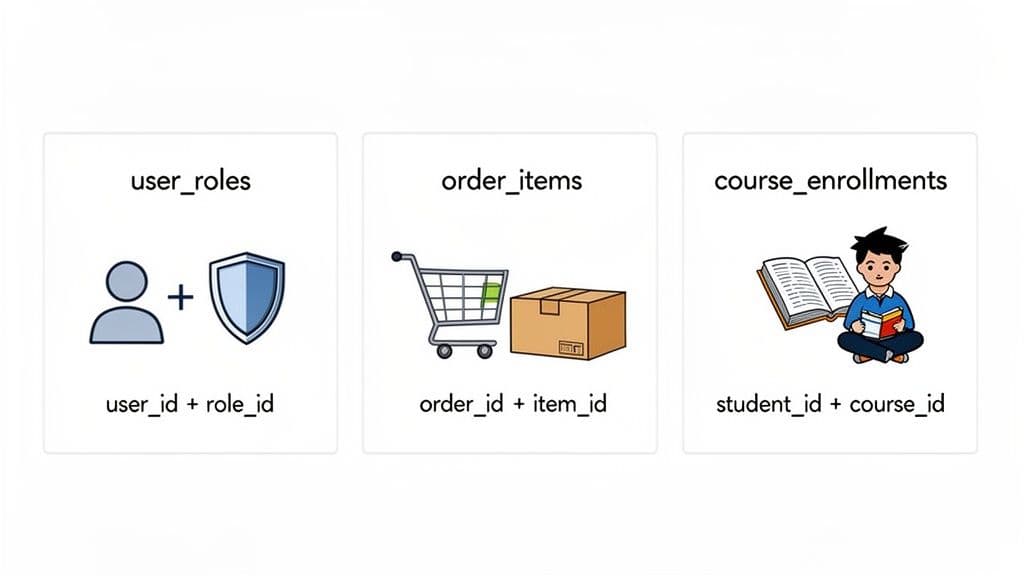
Knowing the syntax is one thing, but truly understanding a composite primary key in SQL comes from seeing it in action. In my experience, the concept really clicks when you move past theory and see how these keys solve common, everyday problems in database design.
Let's walk through three scenarios where a composite key isn't just a quirky alternative, but the most natural and robust choice. You'll notice a theme: they are almost always the star player in junction tables (or linking tables), which form the backbone of many-to-many relationships.
Use Case 1: The User Role System
Just about every application with users needs a way to manage permissions. A user might have several roles (admin, editor, viewer), and any given role can be assigned to countless users. This is a textbook many-to-many relationship.
To connect users and roles, you'll create a junction table, let's call it user_roles. The core business rule here is simple but crucial: you can't give a user the same role twice. Granting the 'admin' role to user #123 should work the first time and fail every time after that.
A composite primary key on (user_id, role_id) enforces this rule right at the database level. It’s a beautifully simple solution.
-- Schema for a user_roles junction table
CREATE TABLE user_roles (
    user_id INT NOT NULL,
    role_id INT NOT NULL,
    assigned_at TIMESTAMPTZ DEFAULT NOW(),
    PRIMARY KEY (user_id, role_id), -- Enforces uniqueness
    FOREIGN KEY (user_id) REFERENCES users(id),
    FOREIGN KEY (role_id) REFERENCES roles(id)
);
Try to insert a duplicate pair, and the database itself will reject it with an error. For instance, INSERT INTO user_roles (user_id, role_id) VALUES (123, 1); succeeds once. The second attempt fails. This protects your data's integrity without a single line of extra application code.
Use Case 2: The E-commerce Order System
Think about the heart of any e-commerce site: orders and products. An order can have many products, and a single product can appear in many different orders. The table that links them, usually called order_items, is a perfect candidate for a composite key.
Each row in order_items represents a line item on a customer's order. What makes a line item unique? It’s not just the order ID, and it's not just the product ID. It's the unique combination of the product within that specific order. So, (order_id, product_id) becomes the natural primary key.
-- Schema for an e-commerce order_items table
CREATE TABLE order_items (
    order_id INT NOT NULL,
    product_id INT NOT NULL,
    quantity INT NOT NULL DEFAULT 1,
    unit_price NUMERIC(10, 2) NOT NULL,
    PRIMARY KEY (order_id, product_id)
);
This design elegantly prevents a product from being added to the same order as two different line items. If a customer adds the same item to their cart again, you shouldn't be inserting a new row; you should be updating the quantity of the existing one.
Actionable Insight: This is where a pattern like
ON DUPLICATE KEY UPDATEin MySQL becomes incredibly handy. You can try to insert a new line item, and if the(order_id, product_id)key already exists, the database can simply increment thequantityfield for you. It makes your "add to cart" logic safer and more straightforward. Here's a practical example:INSERT INTO order_items (order_id, product_id, quantity, unit_price) VALUES (101, 55, 1, 19.99) ON DUPLICATE KEY UPDATE quantity = quantity + 1;
Use Case 3: The University Course Enrollment System
For our final example, let's look at a university's course enrollment system. A student enrolls in many courses, and a course is filled with many students. The enrollments table is what connects students to the courses they’re taking for a given term.
The fundamental rule here is that a student can't enroll in the exact same course twice in the same semester. The unique combination that identifies a single, valid enrollment is the pair of student_id and course_id.
student_id: Identifies the student registering.course_id: Identifies the specific course they're signing up for.
The table schema writes itself:
-- Schema for a course_enrollments table
CREATE TABLE enrollments (
    student_id INT NOT NULL,
    course_id INT NOT NULL,
    enrollment_date DATE NOT NULL,
    grade CHAR(1),
    PRIMARY KEY (student_id, course_id)
);
With this composite primary key in SQL, the database guarantees that a record like (student_id: 101, course_id: 202) can exist only once. This isn't just a technical choice; it’s the database directly enforcing a real-world business rule. In all these cases, the composite key becomes a core part of your application's logic, ensuring data integrity from the ground up.
How Composite Keys Impact Performance and Indexing
A composite primary key does more than just guarantee unique rows; it's one of your most important performance-tuning tools. In many database systems, especially engines like MySQL's InnoDB, the primary key literally dictates how your data is physically arranged on the disk. Getting this right is crucial for building applications that can scale.
When you define a composite primary key, you're not just setting a rule. You're actually creating a powerful multi-column index behind the scenes. This index is meticulously organized, and the order of the columns you choose is the single most important decision you'll make for query speed. It’s not an arbitrary choice.
The Phonebook Analogy for Composite Indexes
Let's stick with our order_items table and its composite key, PRIMARY KEY (order_id, product_id). The best way to think about this is like an old-school physical phonebook, where order_id is the last_name and product_id is the first_name.
-
Searching by
order_idis fast. If you need to find all items in order #123 (WHERE order_id = 123), the database can jump right to the "123" section of its index. It's just like flipping to the 'S' section to find all the Smiths in the phonebook. Easy and efficient. -
Searching by
order_idandproduct_idis lightning fast. A query likeWHERE order_id = 123 AND product_id = 456is the most direct lookup you can do. The database uses the entire index to pinpoint the exact record it needs instantly. This is like looking for "Smith, John"—a direct hit. -
Searching by
product_idalone is painfully slow. Now, here’s the trap. What if you try to find every order that contains a specific product (WHERE product_id = 456)? The database can't really use your primary key index. It’s like trying to find every person named "John" in the phonebook without knowing their last names. You have no choice but to scan every single page from front to back.
This behavior is often called the "left-prefix rule." In simple terms, the index only works if your search criteria include the first column (the "left prefix") of the composite key.
The Performance Cost of Ignoring Column Order
Not respecting this column order is a classic mistake and a common source of major performance headaches. Database vendors have found that a surprisingly large chunk—around 35%—of production database problems stem from queries that can't use their indexes properly. And the performance hit isn't small. We're talking about the difference between a query that runs in milliseconds and one that grinds for seconds or even minutes as your table grows.
Actionable Insight: For a composite primary key on columns (A, B, C), the index will be a huge help for queries filtering on (A), (A, B), or (A, B, C). It will be almost useless for queries filtering on (B), (C), or (B, C) alone. In those cases, the database often gives up and just scans the entire table.
Practical Fix: If your application also needs to efficiently find all orders for a given product (
WHERE product_id = ?), you must create a separate, dedicated index on that column.-- For PostgreSQL or MySQL CREATE INDEX idx_order_items_product_id ON order_items(product_id);This creates a second index specifically to make
product_idlookups fast, solving the performance problem without changing your primary key.
The takeaway is simple: design your composite keys around your most common queries. The column you filter on most frequently should always come first. If you find yourself needing to search by the second or third column on its own, that’s a strong sign you need to create a separate, single-column index for it. You can learn more about that strategy in our guide on how to create indexes in SQL.
Working with Composite Keys in a Database GUI
Sure, SQL commands are the bedrock of database management. CREATE TABLE and ALTER TABLE give you direct control, but let's be honest—staring at a command line all day can make it tough to see the forest for the trees. This is where a good database Graphical User Interface (GUI) becomes an indispensable part of your toolkit.
A GUI doesn't replace your SQL skills; it complements them by translating abstract code into an intuitive, visual map of your data. This is a game-changer when you're wrestling with composite primary keys, where understanding the web of relationships and ensuring data integrity is everything.
From Code to Clarity
Picture this: you've just inherited a legacy database. Your first task is to understand its structure. Instead of spending hours running DESCRIBE commands and digging through schema files, a GUI lets you see the entire layout at a glance. Tools like TableOne are built specifically to bridge this gap, showing you not just tables and columns, but exactly how they all connect.
A visual layout immediately clarifies which tables use composite keys and how other tables reference them through foreign keys. You can trace the flow of data without writing a single line of SQL.

As this diagram shows, the right keys directly impact performance. A well-chosen composite primary key ensures your queries are fast and efficient. A poorly designed one? It leads to slow, painful performance degradation. A GUI helps you spot these structural wins and potential pitfalls before they become production nightmares.
Actionable Insights Through Visualization
A solid database GUI is more than just a pretty picture of your schema; it’s an interactive workspace that helps you manage your data with confidence. This becomes especially clear when you're working with complex structures like junction tables, which almost always rely on a composite primary key.
Here’s how a GUI makes a real difference in your day-to-day workflow:
- Instant Key Identification: Instead of running
SHOW CREATE TABLE, you can see which columns make up a composite key at a glance, often with a simple icon or visual highlight. - Relationship Tracing: Ever get lost trying to figure out which tables are connected? With a GUI, you can often just click on a foreign key relationship to navigate directly to the parent table, instantly understanding the data's lineage.
- Confident Data Editing: Manually editing data in a junction table is risky. A smart GUI understands the underlying foreign key constraints and can prevent you from creating orphaned records or violating data integrity. It's like having a safety net.
Actionable Insight: A powerful GUI transforms your database from a collection of abstract text files into a tangible, interactive system. It provides the guardrails needed to explore, debug, and manage data efficiently, especially when dealing with the intricacies of a composite primary key. For example, when trying to delete a user, a good GUI can warn you that records in the
user_rolestable depend on it, preventing you from accidentally orphaning data.
By visualizing these connections, you'll find yourself debugging issues faster, building a deeper mental model of your data structures, and managing your database with far greater confidence. Think of it as adding a powerful visual layer on top of your existing SQL expertise—a combination that makes you more effective and productive.
Composite Key Best Practices and Common Pitfalls
Getting your composite primary key in sql right from the start can save you from a world of hurt later on. While they're incredibly powerful for modeling certain relationships, composite keys come with their own set of trade-offs and potential traps. Knowing when—and more importantly, how—to use them is the mark of a seasoned database designer.
Think of it this way: a composite key is a precision tool. You need it to be strong, but also lean. The key to this is keeping it as "narrow" as possible.
Keep Your Keys Narrow and Efficient
Here’s something that trips people up: the columns in your composite key get copied into every single secondary index on that table. If you build a wide, clunky key out of long VARCHAR strings, you’re not just wasting space in one place; you’re bloating every index, which slows down writes and eats up storage.
To avoid this, be picky about your data types:
- Go for Integers: Whenever you can, use
INTorBIGINT. They’re small, memory-efficient, and blazing fast for the database to compare. - Ditch Wide Strings: If a string is unavoidable, keep it short and sweet. A
VARCHAR(255)column has no business being in a primary key; it's a major performance red flag. - Use Just Enough Precision: Don't use a
BIGINTwhen aSMALLINTwill do. Choose the smallest data type that can safely hold all possible values.
A narrow key is a high-performance asset. A wide one is a performance bottleneck waiting to happen.
Actionable Insight: A composite primary key is a foundational choice that ripples through your database design. A wide key not only bloats the primary table but also every foreign key that references it, creating a cascading effect on storage and performance. For example, using two
BIGINTcolumns (8 + 8 = 16 bytes) for a key is far better than twoVARCHAR(50)columns, which could use up to 100+ bytes per reference, significantly inflating the size of related tables and their indexes. Make every byte count.
Be Deliberate About Column Order
As we've seen, the order of columns in a composite key isn't just for looks—it directly controls how the underlying index works. Thanks to the "left-prefix" rule, the index is most useful for queries that filter on the first column in the key.
Your best bet is to always put the column with the highest cardinality (the most unique values) first, especially if it's the one you filter on most often. For that order_items table with (order_id, product_id), if your most common query is finding all items for a specific order, then order_id absolutely has to be the first column.
Pitfall: The Awkwardness of Wide Foreign Keys
Now for the big catch. When another table needs to point back to a table with a composite key, things can get messy. To set up a foreign key relationship, the child table must copy all the columns from the parent's composite key.
For instance, referencing a user_roles (user_id, role_id) table is simple enough. But imagine your key was something like (organization_id, department_name, employee_code). Any table needing to reference a specific record would have to lug around all three of those columns, making your schema clunky and your JOIN clauses a headache. You can get a deeper dive into this in our guide on PostgreSQL foreign keys.
This is a critical trade-off to consider. If you expect many other tables will need to reference this data, using a single-column surrogate key (like a simple id) is often the more practical choice. It might not feel as "logically pure," but it keeps your other tables clean and your relationships simple, which is a massive win in the long run.
Frequently Asked Questions
Working with composite keys often brings up a few common questions, especially when you're trying to nail down the perfect database model. Let's walk through some of the things developers frequently ask.
Can Any Part of a Composite Primary Key Be Null?
That's a hard no. The golden rule for any primary key, whether it's a single column or a composite one, is that it can never be NULL.
Think about it: the whole point of a primary key is to give every single row a unique, reliable identity. A NULL value means "unknown" or "missing," which makes it impossible to uniquely identify anything. So, by definition, every column in a composite key automatically gets a NOT NULL constraint.
When Should I Use a Surrogate Key Instead?
This is the classic debate: the "natural" composite key versus a simple, auto-incrementing surrogate key (like an id column). The right choice really boils down to a trade-off between business logic purity and day-to-day practicality.
Actionable Insight: A good rule of thumb: Use a composite key when the combination of columns is the actual business rule. But if a table is going to be a central hub referenced by many other tables, a surrogate key is almost always simpler.
A junction table like user_roles (user_id, role_id) is a perfect example where a composite key makes sense. The key is the relationship. On the other hand, for a table like invoices, which might be referenced by payments, line_items, and shipping_records, just give it a single invoice_id. Your future self will thank you when writing all those foreign keys and joins.
How Do ORMs Handle Composite Keys?
Modern Object-Relational Mappers (ORMs) like Prisma or SQLAlchemy are perfectly capable of handling composite keys, but you can't be lazy about it. They need you to be very explicit about which fields make up the unique identifier in your model.
For example, this is how you’d define one in a Prisma schema:
model OrderItem {
  orderId   Int
  productId Int
  quantity  Int

  order   Order @relation(fields: [orderId], references: [id])
  product Product @relation(fields: [productId], references: [id])

  @@id([orderId, productId])
}
While the support is there, just be aware that things can get a bit more verbose. Managing relationships and writing queries against these multi-part keys often takes more code than with their single-column surrogate key counterparts. It’s always a good idea to check your ORM's documentation for the recommended patterns.
Ready to stop wrestling with command lines and start visualizing your database with confidence? TableOne is a modern, cross-platform database tool that makes everyday data work fast and predictable for PostgreSQL, MySQL, and SQLite. Explore schemas, edit data, and manage keys with a tool designed for developers.


