How to Compare Database Schemas: A Practical Guide for Developers
Master compare database schemas to prevent bugs and ensure consistency. Learn practical steps and tools for PostgreSQL, MySQL, and SQLite with clear examples.
When we talk about comparing database schemas, we're really talking about spotting the structural differences between two versions of your database. It's an essential discipline for catching unexpected changes, stopping deployment failures in their tracks, and protecting data integrity as your application moves between environments like development, staging, and production.
Why You Can't Afford to Ignore Schema Differences
Schema drift is the quiet threat that can completely derail your application. It creeps in when the structure of one database environment—its tables, columns, indexes, or constraints—starts to differ from another, often without anyone realizing it. These subtle changes are notorious for causing catastrophic bugs, data corruption, and painful deployment rollbacks that are a nightmare to diagnose.
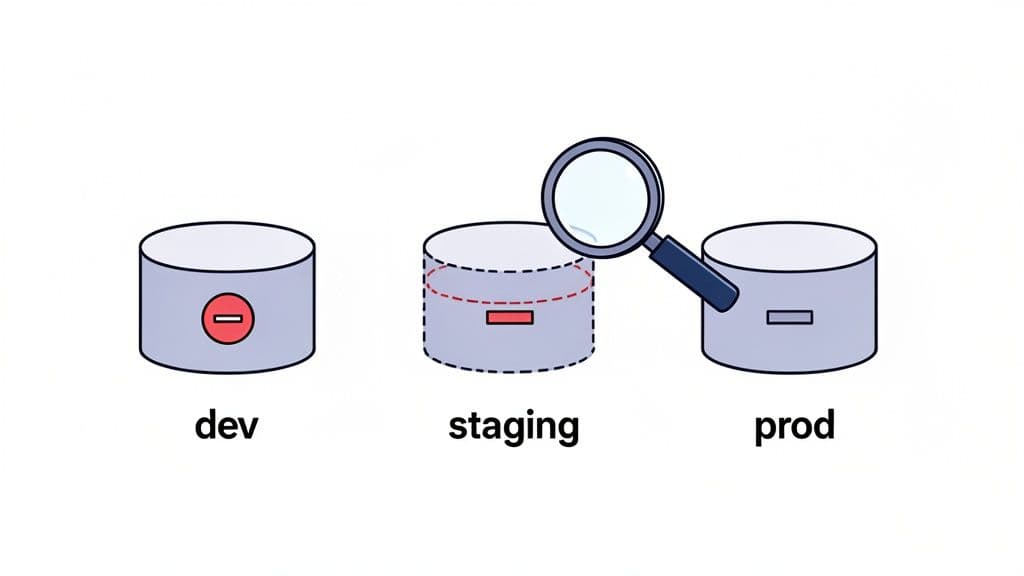
By actively comparing schemas, your team can get ahead of these problems. Instead of scrambling to fix a broken production environment, you're catching potential issues long before they're ever merged. This simple practice builds a much more reliable and predictable development cycle.
Common Times You Need to Compare Schemas
The need to compare schemas pops up all the time in day-to-day development. Once you know what to look for, you can build schema comparison right into your workflow, turning it from an emergency procedure into a standard practice.
You'll definitely want to run a schema diff in these key moments:
- Before a Deployment: You absolutely must verify that your staging schema matches production before you ship. This is your final check to ensure all migrations have been applied and no manual "hotfixes" have thrown things out of sync. For example, a missing index on the
users.emailcolumn in production could cause login queries to time out under load, even if it worked fine in staging. - Keeping Dev Environments Aligned: When several developers are working on different feature branches, their local database schemas can diverge quickly. A quick comparison helps get everyone on the same page and puts an end to those "works on my machine" headaches.
- Debugging Environment-Specific Bugs: If a feature works perfectly in development but breaks in staging, an unexpected schema difference is one of the first things you should suspect. A schema comparison can often pinpoint the root cause in minutes. A practical example: an API endpoint fails because a
descriptioncolumn was changed fromTEXTtoVARCHAR(255)in staging, causing data truncation errors.
The most dangerous changes to your schema are the ones you don't know about. An unindexed column in production can grind queries to a halt, while a missing
NOT NULLconstraint might be silently corrupting your data. Regular comparisons are your best line of defense.
Of course, a solid foundation starts with good design principles from day one. To learn more about that, you might find our guide on how to design a database schema helpful.
The Payoff: What Consistent Schema Management Gives You
Ultimately, making schema comparison a routine practice delivers real-world benefits that go far beyond just preventing bugs. It helps foster a more resilient and efficient engineering culture.
| Benefit | How It Improves Your Workflow |
|---|---|
| Deploy with Confidence | Removes the fear of production deployments by guaranteeing the database is in the state you expect. Your team can ship features faster and more often. |
| Debug Faster | When you can rule out schema differences as the cause of a bug, your team can focus its energy on the application logic where the real problem likely is. |
| Improve Teamwork | Creates a single source of truth for your database structure, leading to more productive code reviews and a smoother onboarding process for new developers. |
Choosing Your Schema Comparison Strategy
Figuring out the best way to compare two database schemas isn't always obvious. The right method really depends on what you're trying to accomplish—are you doing a quick gut check, or do you need a forensic-level audit? Let's walk through the three main approaches I've seen in the wild: comparing SQL dumps, digging into database introspection, and analyzing migration files.
Each one gives you a different view of the same landscape. Knowing which one to pick for the job at hand will save you a ton of time and get you the clear answers you need.
Comparing Raw SQL Dumps
The most direct route is to just dump the schema from each database and run a diff on the text files. You can get a schema-only SQL dump using a command-line tool like pg_dump --schema-only for PostgreSQL or mysqldump --no-data for MySQL. Once you have the two files, you can use any standard diff tool to see what’s changed.
This is a great approach for a quick-and-dirty comparison. It's fast, and you don't need any special tools. The big downside, though, is that the output is incredibly "noisy."
A raw SQL diff will often highlight trivial differences that don't affect application behavior, such as comment changes, auto-increment counter values, or slight variations in whitespace. This noise can easily obscure the critical structural changes you’re actually looking for.
Using Database Introspection
For a much cleaner and more powerful comparison, you can turn to database introspection. This technique involves querying the database's own internal metadata catalogs. Nearly every modern database has a built-in schema, usually called information_schema, that documents itself—it’s full of tables describing your tables, columns, constraints, and indexes.
By writing targeted SQL queries against these metadata tables, you can pull structured, comparable data about the schema. This lets you compare specific attributes with surgical precision, completely filtering out the noise that makes raw SQL dumps so frustrating.
For instance, you could write a query to list all columns in a table with their data types and default values. Running that against two databases gives you a clean, focused diff that only shows you what truly matters. It’s the perfect method for building automated checks and detailed reports.
Analyzing Migration Files
The third strategy involves a mental shift: you stop looking at the live database and start looking at your code. If your team uses an ORM like Django, Rails, or Prisma, your migration files are the source of truth for the schema. These files are a version-controlled history of every single change made to the database structure.
With this approach, a "schema comparison" means diffing sets of migration files, usually between two Git branches. It’s less about comparing what's in two databases right now and more about understanding how a proposed change will alter the schema once it’s applied. This makes it an incredibly powerful, proactive tool for code reviews.
When a developer opens a pull request with a new migration, you’re essentially looking at a schema diff before it ever hits a production environment. For example, if a PR adds a migration to create an is_premium boolean column on the users table, the file diff in the PR immediately highlights this change for reviewers.
Schema Comparison Method Analysis
So, which path should you take? It all boils down to your specific context. A developer trying to sync their local environment might just need a quick SQL dump. A DevOps engineer setting up automated drift detection, on the other hand, will almost certainly need the precision of introspection.
This table breaks down the trade-offs.
| Method | Best For | Advantages | Disadvantages |
|---|---|---|---|
| SQL Dumps | Quick sanity checks and verifying major structural integrity. | Simple to execute with standard tools; provides a complete snapshot. | Output is often noisy and can be hard to parse for meaningful changes. |
| Introspection | Automated auditing and generating precise, granular diff reports. | Highly accurate and customizable; can ignore irrelevant details. | Requires writing and maintaining specific SQL queries for each database engine. |
| Migration Files | Code reviews and integrating schema validation into a CI/CD pipeline. | Proactively catches changes before they are applied; serves as a historical record. | Only reflects the intended state; cannot detect manual changes (schema drift). |
Ultimately, many teams find themselves using a mix of these techniques. You might use migration diffs for code reviews, but rely on introspection for an hourly production-vs-staging check. Knowing the strengths of each method lets you build a more robust process.
Comparing Schemas in PostgreSQL and MySQL
When it comes to comparing schemas in PostgreSQL and MySQL, the core ideas are the same, but the devil is in the details—specifically, the commands and system catalogs you’ll use. Both are fantastic databases, but getting a clean, actionable comparison means tailoring your approach to their distinct architectures.
We'll walk through a few hands-on methods for each, from quick command-line diffs to more surgical introspection queries. Your choice really boils down to what you need to accomplish right now. Are you doing a quick sanity check before a deploy, or are you building an automated audit that demands precision? This flowchart can help you decide on a starting point.
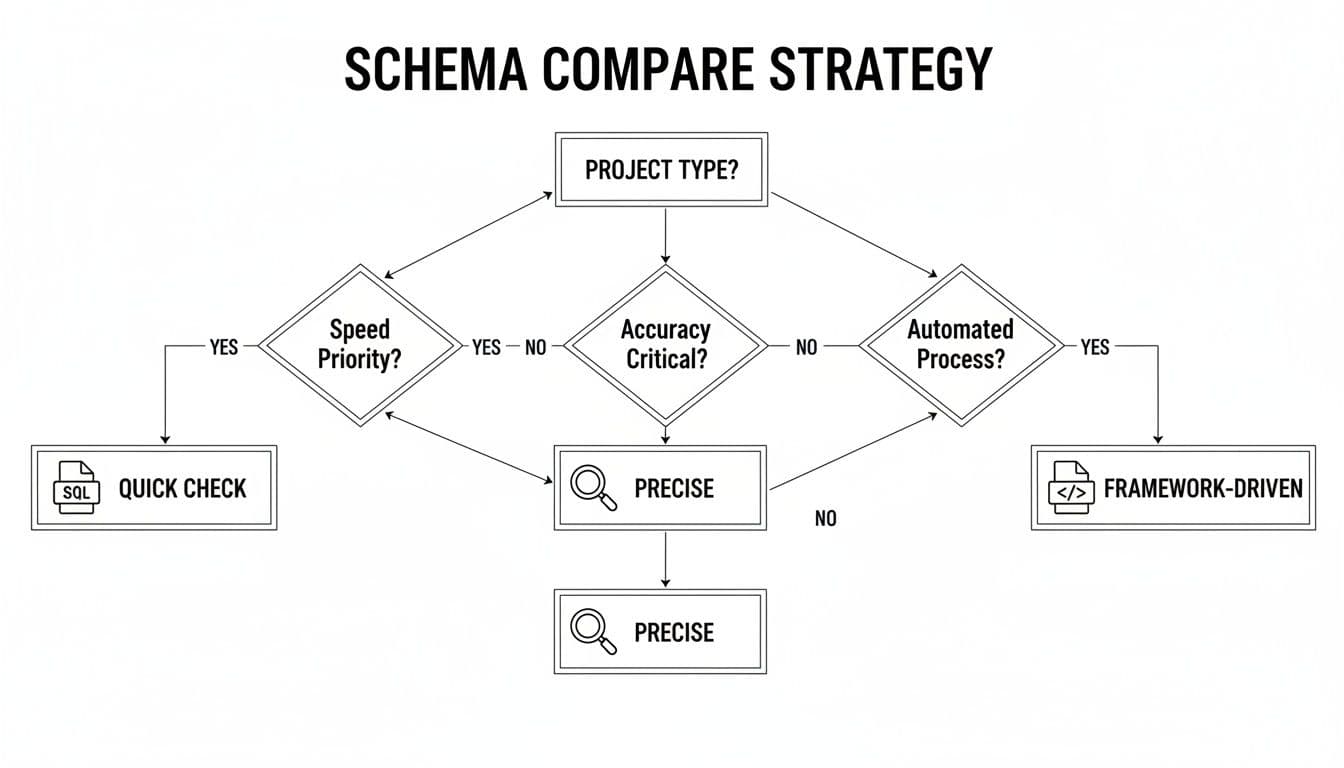
As you can see, there’s a classic trade-off. Using SQL dumps is fast but can be noisy. On the other hand, methods based on introspection or frameworks give you much higher accuracy, but they take a bit more effort to set up.
PostgreSQL Schema Comparison Techniques
PostgreSQL makes schema extraction pretty easy. The go-to tool for a quick comparison is pg_dump. By using the --schema-only flag, you can generate a SQL file with just the CREATE statements for your tables, views, and other database objects.
To compare your development and production databases, you’d run these commands:
# Dump the schema from the development database
pg_dump --schema-only -h dev_host -U user -d dev_db > dev_schema.sql

# Dump the schema from the production database
pg_dump --schema-only -h prod_host -U user -d prod_db > prod_schema.sql
With those two files in hand, a simple diff command (diff dev_schema.sql prod_schema.sql) will highlight the differences. It’s a good first pass, but you’ll often get bogged down in “noise” from things like comment changes or slight variations in how objects are ordered in the dump file.
For a much cleaner comparison, you can query PostgreSQL’s pg_catalog system schema directly. This lets you sidestep all the irrelevant text and focus squarely on the structural details that matter: column names, data types, nullability, and so on.
Actionable Insight: By querying
pg_catalogdirectly, you can build a highly customized comparison script. This is the secret to creating clean, automated reports that highlight only the schema differences that truly matter to your application's stability.
For instance, if you wanted a clean list of tables and columns from the public schema, a query like this gets straight to the point:
SELECT
  t.tablename,
  c.column_name,
  c.data_type,
  c.is_nullable
FROM
  pg_catalog.pg_tables t
JOIN
  information_schema.columns c ON t.tablename = c.table_name
WHERE
  t.schemaname = 'public' AND c.table_schema = 'public'
ORDER BY
  t.tablename,
  c.ordinal_position;
Running this query against both databases and comparing the structured output (e.g., as CSV files) gives you a far more precise and useful diff.
MySQL Schema Comparison Workflows
MySQL has a very similar workflow, but it revolves around the mysqldump utility and the information_schema database. To get a schema-only dump, you’ll use the --no-data flag.
Here’s what that looks like:
# Dump the schema from the development database
mysqldump --no-data -h dev_host -u user -p dev_db > dev_schema.sql

# Dump the schema from the production database
mysqldump --no-data -h prod_host -u user -p prod_db > prod_schema.sql
Just like with PostgreSQL, running diff dev_schema.sql prod_schema.sql gives you a comparison. But you'll hit the same noise problem, especially with things like AUTO_INCREMENT values, which are often different between environments and show up in the CREATE TABLE statements.
The better way is to query MySQL’s information_schema. This metadata database acts just like PostgreSQL's catalog, giving you a structured, queryable view of your schema. This is where you can find the subtle-but-critical drift that dump files might obscure.
Some classic examples of what introspection can catch:
- Collation Mismatches: A
utf8mb4_unicode_cicolumn in dev versusutf8mb4_general_ciin prod can lead to very confusing sorting bugs. - Data Type Variations: A developer might use
TEXTon their local machine, but the production instance actually needsMEDIUMTEXTto handle larger data. - Constraint Differences: A missing
FOREIGN KEYconstraint in one environment is a ticking time bomb for data integrity.
This query is a great starting point for listing columns and their attributes, helping you zero in on those kinds of discrepancies:
SELECT
  TABLE_NAME,
  COLUMN_NAME,
  DATA_TYPE,
  IS_NULLABLE,
  COLUMN_DEFAULT,
  COLLATION_NAME
FROM
  information_schema.COLUMNS
WHERE
  TABLE_SCHEMA = 'your_database_name'
ORDER BY
  TABLE_NAME,
  ORDINAL_POSITION;
When you compare database schemas with targeted queries like this one, you gain a level of precision that a simple file diff can’t match. It makes spotting what's important—and what isn't—much easier, helping you keep all your environments in sync.
While big, server-based databases often get all the attention, many of us work with simpler engines like SQLite or face the gnarly challenge of migrating between different database systems entirely. When it comes to comparing schemas, these two scenarios couldn't be more different.
Let's walk through how to handle each one, starting with the straightforward world of SQLite and then tackling the much tougher job of comparing schemas across engines like MySQL and PostgreSQL.
Comparing SQLite Schemas with the CLI
Comparing SQLite schemas is refreshingly simple. Since an SQLite database is just a single file, you get to skip all the usual headaches with network connections and credentials. The most direct approach is using the command-line interface that comes with it.
The .schema command is your best friend here. It dumps all the CREATE statements for every table, index, and view in your database.
To see the difference between two database files, say database_v1.sqlite and database_v2.sqlite, just run these two commands from your terminal:
sqlite3 database_v1.sqlite .schema > v1_schema.sql
sqlite3 database_v2.sqlite .schema > v2_schema.sql
With those two SQL files in hand, any standard diff tool will give you a clean, line-by-line breakdown of what's changed. It’s a fast, no-fuss method that's perfect for quick checks during development. If you do a lot of this, a modern SQLite editor can make the process even smoother.
The Challenge of Cross-Engine Schema Comparison
Now, for the hard part. Comparing schemas between two entirely different database engines—like moving from MySQL to PostgreSQL—is a different beast altogether. You can't just diff the schema dump files. The SQL dialects, data types, and core features are so distinct that a direct comparison would just spit out a wall of meaningless differences.
Actionable Insight: When you're migrating between databases, a schema comparison isn't about finding identical text. It’s about confirming functional equivalence. You need to know that a
SERIALin PostgreSQL will behave just like anAUTO_INCREMENTin MySQL, or that aBLOBcorrectly maps to abytea.
This means you have to think conceptually. Instead of comparing raw SQL, you need to analyze the intent of the schema and translate it from the source to the target. This is where specialized database tools really earn their keep, as they're built to understand and abstract these differences for you.
Critical Pitfalls in Cross-Engine Comparisons
When you're making a jump between database systems, a few classic "gotchas" can completely derail your project. If you know what to look for, you can get ahead of these problems.
1. Data Type Incompatibilities
This is hands-down the most common source of trouble. A data type in one engine rarely has a perfect one-to-one match in another.
- ENUMs: Both MySQL and PostgreSQL have an
ENUMtype, but they're not the same. A PostgresENUMis a proper static type, whereas a MySQLENUMis basically a string with benefits. - Binary Data: Mapping MySQL's
BLOBto PostgreSQL'sbyteaseems simple, but their performance profiles and size limits can be quite different. - Dates and Times: Even something as basic as
DATETIMEin MySQL versusTIMESTAMPin PostgreSQL can cause headaches due to subtle differences in time zone handling and precision.
2. Auto-Incrementing Primary Keys
Every modern database handles auto-incrementing keys, but they all do it their own way. A migration script has to get this translation exactly right.
- MySQL: Relies on the
AUTO_INCREMENTcolumn property. - PostgreSQL: Uses
SERIAL,BIGSERIAL, or the more modern identity columns (GENERATED BY DEFAULT AS IDENTITY), which are powered by sequence objects. - SQLite: Has its own convention with
INTEGER PRIMARY KEY.
Failing to map these correctly means new records either won't save or won't generate primary keys the way your application expects.
3. Advanced Feature Support
Sometimes, an engine-specific feature you rely on has no direct counterpart in your target system. This might force you to refactor parts of your application. For example, PostgreSQL's incredible JSONB support, especially with GIN indexes, provides querying power that older MySQL versions simply can't match. The same goes for things like spatial indexes or full-text search, which are implemented in vastly different ways across engines.
Automating Schema Comparison in Your CI/CD Pipeline
Running manual schema comparisons is great for a quick, one-off sanity check. But the real magic happens when you build this process directly into your development workflow. By integrating schema diffing into your CI/CD pipeline, you turn it from a reactive, after-the-fact diagnostic into a proactive safety net. It’s how you catch unexpected database changes before they hit production, protecting your data and letting your team ship code with confidence.
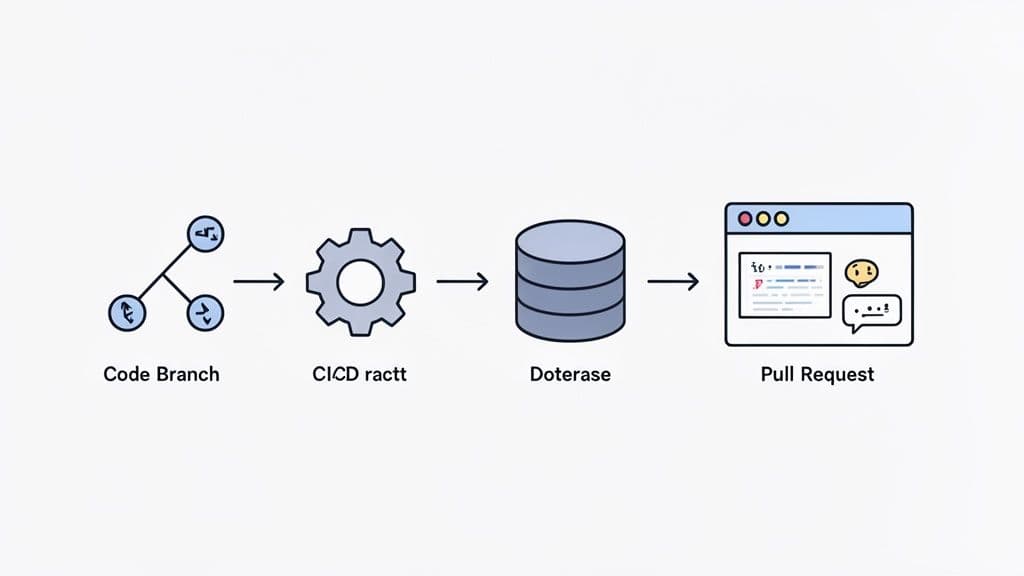
The idea is simple: make schema review a non-negotiable part of code review. When a developer opens a pull request that includes a database migration, an automated job should kick off. It compares the proposed schema changes against a stable baseline (like your main branch or production) and posts a human-readable report directly into the pull request conversation.
Choosing the Right Tools for Automation
To get this workflow running, you’ll need a tool that can generate clean diff reports from the command line. While you could technically cobble something together with a basic diff utility, dedicated schema comparison tools give you far more readable and context-aware results.
These tools generally fall into two camps:
- Open-Source Diff Tools: Projects like
schemaspyormigrafor PostgreSQL are built for the command line, making them a natural fit for scripting in a CI environment. They excel at generating structured, often machine-readable, comparisons of your schema. - Commercial Database GUIs: Many modern database clients have powerful schema comparison features that can also be scripted. Look for tools that offer a command-line interface (CLI), which lets you trigger a comparison and export the report right from your CI runner.
The most important feature to look for is the ability to separate meaningful changes from noise. A good tool will highlight a new column or a dropped index while ignoring insignificant differences like comment updates or auto-increment counter values. This keeps your pull request comments focused on what actually matters.
Here’s what a clean, cross-database schema diff looks like in a modern tool. It cuts through the clutter to show you exactly what changed between a developer's local database and production.
Notice how it immediately draws your eye to the critical change—the new last_login_at column—without any distractions.
A Practical Example with GitHub Actions
So, what does this look like in practice? Let's sketch out a conceptual workflow using GitHub Actions to compare database schemas on every pull request. This setup assumes you have a command-line tool ready to go.
The flow would look something like this:
- Trigger on Pull Request: The entire workflow is triggered whenever a pull request is opened or updated against your
mainbranch. - Set Up the Environment: The job checks out the feature branch's code. It then spins up temporary database containers—one for the "before" state (from
main) and one for the "after" state (from the feature branch). - Apply Migrations: Your migration scripts are run against each database. The first container gets the migrations from
main, and the second gets the new migrations from the feature branch. - Run Schema Comparison: With both databases ready, the schema diff tool runs, comparing the two and saving the output to a file.
- Post Comment to PR: Finally, a simple script uses the GitHub CLI or a pre-made Action to post the diff report as a comment on the pull request for the whole team to see.
# A conceptual GitHub Actions workflow
name: 'Database Schema Diff'
on:
  pull_request:
    branches: [ main ]

jobs:
  schema-diff:
    runs-on: ubuntu-latest
    steps:
    - name: 'Checkout main branch and setup baseline DB'
      # ... steps to create a DB from the main branch schema

    - name: 'Checkout PR branch and setup target DB'
      # ... steps to create a DB from the feature branch schema

    - name: 'Run schema comparison tool'
      id: diff
      run: |
        # Use a tool to compare the two databases
        # and output the diff to a file
        my-schema-tool compare \
          --source "baseline_db_connection_string" \
          --target "target_db_connection_string" \
          > schema_diff.md

    - name: 'Post diff as PR comment'
      uses: actions/github-script@v6
      with:
        script: |
          // Read diff file and post to PR
          const fs = require('fs');
          const output = fs.readFileSync('schema_diff.md', 'utf8');
          github.rest.issues.createComment({
            issue_number: context.issue.number,
            owner: context.repo.owner,
            repo: context.repo.repo,
            body: '### Schema Changes Detected\n\n' + output
          })
Once you have this automated check in place, your team can review database changes with the same rigor and confidence as the rest of your application code. It’s a core practice for building and maintaining a reliable system. If you want to explore this further, our guide on database migration best practices offers more in-depth strategies.
Practical Questions on Database Schema Comparison
Once you get the hang of the basics, the real-world headaches start to pop up. You’ll find yourself wrestling with specific situations that aren't always covered in the "hello world" tutorials. This section answers those common follow-up questions with direct, practical advice from the field.
How Can I Ignore Minor Differences Like Auto-Increment Values?
This is a classic problem. You run a diff and get a wall of text showing differences in AUTO_INCREMENT counters in MySQL or sequence values in PostgreSQL. This isn't a real schema change—it's just noise that makes spotting the actual problems nearly impossible.
The trick is to filter your comparison, and how you do it depends on your method.
- Using SQL Dumps: If you're working with
diffon the command line, you can pipe the output through other tools. For instance, usinggrep -vto exclude lines containingAUTO_INCREMENT=can help clean up a MySQL dump. It's a quick fix, but it can be fragile and might accidentally hide something important. - Using Introspection Queries: Here, you have total control. You simply write your queries to avoid selecting volatile data in the first place. When you query
information_schema.TABLESin MySQL, for example, just don't include theauto_incrementcolumn in yourSELECTstatement. - Using Dedicated Tools: Most schema comparison tools are built for this. They come with "ignore rules" that let you specify objects, properties, or even patterns to exclude. This is easily the most reliable and powerful way to focus a diff on what truly matters.
Actionable Insight: The most effective strategy is to use a tool or a targeted query that focuses exclusively on structural definitions. Unless you have a specific reason to track them, you should almost always ignore object permissions, comments, and auto-increment values.
This approach ensures your diffs only show you the changes you care about: a new table, an altered column, a modified index, or a dropped constraint. Those are the changes that can break your application.
What Is the Best Way to Compare Schemas Between Local Docker and Cloud?
Comparing a database running locally in Docker against a managed cloud instance like Amazon RDS, Neon, or PlanetScale is an everyday task for modern teams. The network gap can seem like a major hurdle, but the process is actually quite simple if you pick the right tool for the job.
Without a doubt, the most robust method is to use a dedicated database tool that can connect to both sources live.
This approach just works better for a few key reasons:
- It handles the connection details. The tool figures out how to talk to your local instance (e.g.,
localhost:5432) and your remote cloud database, which might need an SSL connection or even an SSH tunnel. You don't have to fuss with it. - It compares the live schemas. Instead of relying on dump files that might be minutes or hours old, the tool queries the metadata from both databases in real-time. This gives you a perfectly accurate, side-by-side diff.
- It can generate the migration script. Many tools can look at the differences and automatically generate the SQL needed to sync the target schema with the source. This is a massive time-saver for pushing local changes to a shared staging environment.
If you don't have a dedicated tool, you can fall back on schema dumps, but you have to be careful.
To make it work, you must:
- Use the exact same flags for your local
pg_dumpormysqldumpcommand as you do against the cloud database. Any variation can introduce noise. - Watch out for version differences. If your local Docker image is running PostgreSQL 15 but your cloud instance is on PostgreSQL 14, the dump output might have subtle syntax variations that show up as false positives in your diff.
While dumps can get the job done, a live comparison with a good GUI tool is faster, safer, and gives you much more actionable results for this kind of workflow.
Should I Use ORM Migrations or a Direct Database Comparison?
This isn't an "either/or" dilemma. A mature team uses both, because they solve two completely different problems. Relying on just one leaves you with a major blind spot.
Here’s a better way to think about it: comparing migration files is for code review, while direct database comparison is for environment auditing.
Comparing ORM Migration Files This is about reviewing the intended changes. When a developer opens a pull request with a new migration file, you're looking at the proposed evolution of your database schema. It’s your "source of truth."
- Purpose: To validate schema changes as part of your development process.
- When to Use: During code review, for every single pull request that touches the database.
- Strength: It’s a proactive check. You catch design flaws and mistakes before the code is ever merged, ensuring your schema’s history is version-controlled and peer-reviewed.
Actionable Insight: The real value here is making sure your codebase's definition of the schema is correct and consistent. It answers the question, "Is this proposed change what we want?"
Direct Database-to-Database Comparison This is about finding schema drift. Drift happens whenever someone makes a manual change directly on a database, bypassing your ORM and migration process. Think of a hotfix applied directly to production to solve an urgent bug—that's drift.
- Purpose: To find and fix unexpected differences between your live environments.
- When to Use: As an automated CI job running on a schedule (e.g., hourly) to compare staging vs. production. It’s also the first tool you should grab when debugging an environment-specific bug.
- Strength: This is the only way to know what the schema actually is in an environment, regardless of what your migration files say. It answers the question, "Are our environments still in sync?"
The ideal workflow uses both. You diff migration files in pull requests to build things correctly, and you run automated, direct schema comparisons as a safety net to guarantee that what's running in production is exactly what you planned.
Managing schema drift and ensuring consistency across environments is a critical but often tedious task. TableOne is designed to make this process fast and predictable. With its built-in, cross-database schema comparison tool, you can instantly connect to your local and remote databases—whether they're SQLite, PostgreSQL, or MySQL—and get a clear, actionable report of the differences. Stop wrestling with noisy SQL dumps and start deploying with confidence.
Explore all the features and get your license today at https://tableone.dev.


