The Ultimate SQL Join Cheat Sheet for Developers (2026)
Your definitive SQL join cheat sheet. Master INNER, OUTER, and advanced joins with practical, copy-paste examples for PostgreSQL, MySQL, and SQLite.

This guide is a quick, copy-pasteable reference for the most common SQL joins. It’s built to be your go-to resource for matching, combining, and analyzing data from multiple tables, packed with syntax examples and visual diagrams to get the job done right.
Your Quick Reference SQL Join Cheat Sheet
Working with SQL means constantly bringing data together from different tables, and SQL joins are the workhorse for doing just that. Getting a firm grip on the core types—INNER, LEFT, RIGHT, and FULL OUTER JOIN—is essential for anyone working with relational databases.
Each join serves a very specific purpose. Sometimes you only want matching records, and other times you need to see what data exists in one table but is missing from another. This cheat sheet is designed to help you quickly pick the right join, grab the syntax, and move on. If you're just getting started, you might want a quick primer on how to run SQL queries before diving in.
SQL JOIN Types At a Glance
To get a feel for how these joins compare, this table gives you a quick visual and practical summary.
| Join Type | Venn Diagram (Visual) | Core Purpose | Basic Syntax Example |
|---|---|---|---|
INNER JOIN | Center overlap | Returns only rows with matching values in both tables. | SELECT ... FROM A INNER JOIN B ON A.key = B.key; |
LEFT JOIN | Left circle + overlap | Returns all rows from the left table and matched rows from the right. Unmatched rows in the right table are NULL. | SELECT ... FROM A LEFT JOIN B ON A.key = B.key; |
RIGHT JOIN | Right circle + overlap | Returns all rows from the right table and matched rows from the left. Unmatched rows in the left table are NULL. | SELECT ... FROM A RIGHT JOIN B ON A.key = B.key; |
FULL OUTER JOIN | Both full circles | Returns all rows when there is a match in either the left or the right table. Unmatched rows are filled with NULL. | SELECT ... FROM A FULL OUTER JOIN B ON A.key = B.key; |
This high-level view is a great starting point before we dig into the specifics of each join type.
The Four Main SQL Joins
The infographic below offers another way to visualize the four primary join types, complete with their purpose and basic syntax.
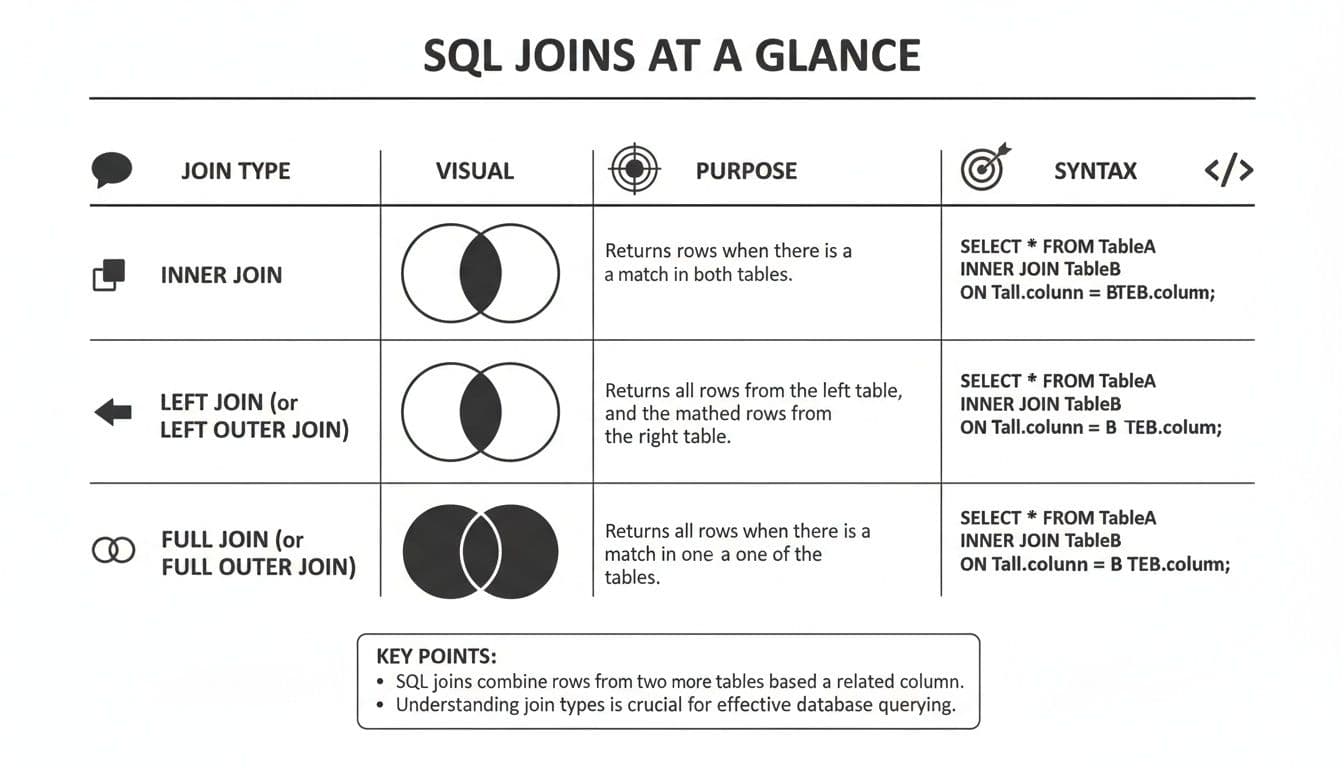
It’s easy to see how an INNER JOIN narrows down your results to only what's shared between two tables. In contrast, the OUTER JOIN variations are all about preserving records from one or both tables, even when a match doesn't exist. This is key for spotting gaps or mismatches in your data.
1. INNER JOIN: The Workhorse for Matched Data
The INNER JOIN is the first join most people learn, and for good reason—it’s the one you’ll use most often. Its job is simple: find rows in two tables that share a matching value and combine them. Anything without a match gets left out.
Think of it as the intersection of a Venn diagram. You're telling the database, "Only give me the records that exist in both of these tables based on this specific condition." It’s clean, efficient, and predictable.
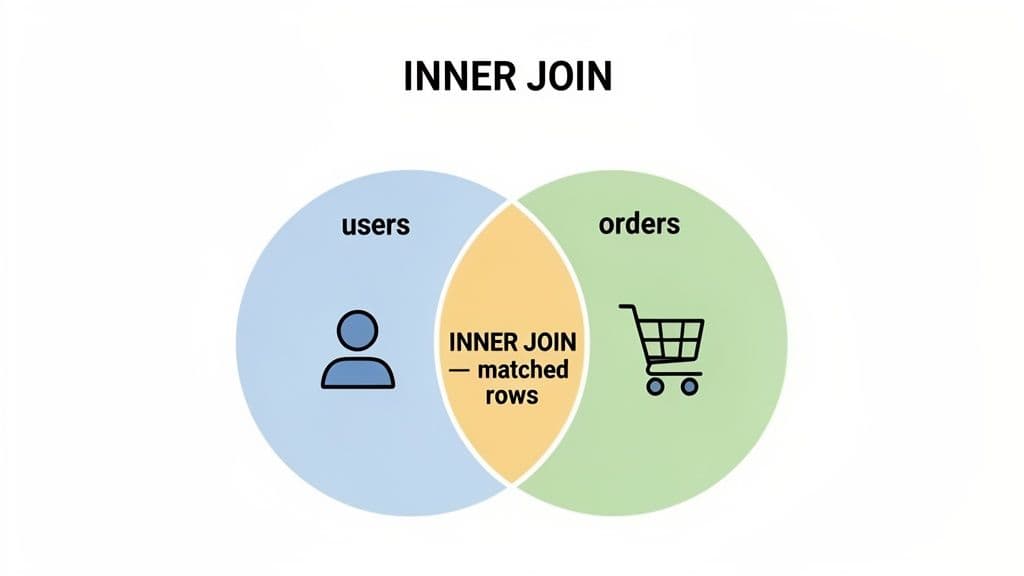
This straightforward logic is why INNER JOIN is a developer favorite. The concept was famously visualized in a 2009 blog post by Jeff Atwood that drew over 1.2 million views, cementing the Venn diagram as the go-to explanation. Today, the INNER JOIN accounts for an estimated 68% of all joins in production databases. And on large tables, it can run up to 2.5x faster than an outer join, which is a huge performance win. For more SQL tips, check out this great SQL join cheat sheet from Beekeeper Studio.
Practical Example: Finding Users with Orders
Let's put this into practice. Imagine you have a users table and an orders table, and you want to see a list of users who have actually placed an order.
userstable: Holdsuser_idandname.orderstable: Holdsorder_idand auser_idto link back to the user who made the purchase.
Here’s how you'd find every user who has at least one corresponding entry in the orders table.
SELECT
    u.name,
    o.order_id,
    o.order_date
FROM
    users u
INNER JOIN
    orders o ON u.user_id = o.user_id;
This query connects the two tables using the user_id column. If a user’s ID appears in both users and orders, their name and order details will show up in the results. Users who haven't placed an order are automatically filtered out.
Actionable Insight: Reach for an
INNER JOINany time you need a definitive list of matching data. It's perfect for reports like "Customers with Purchases," "Products with Reviews," or "Students enrolled in Courses." It inherently weeds out all the noise from unmatched records, giving you faster, cleaner results.
Understanding OUTER JOINs: LEFT, RIGHT, and FULL
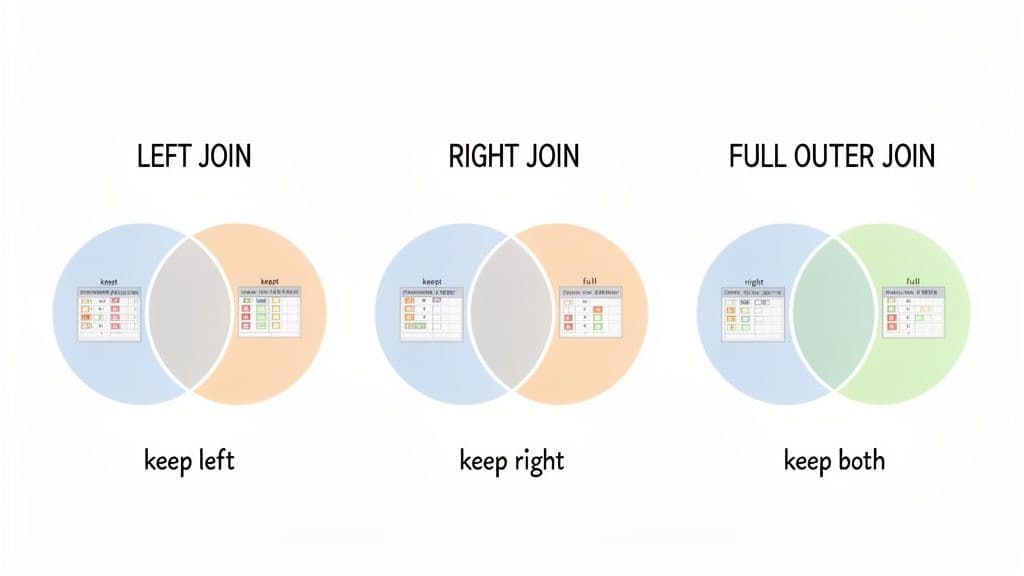
While an INNER JOIN is great for finding what matches, its real value becomes clear when you compare it to the OUTER JOIN. An outer join is built to show you not just the matches, but also what doesn't match. This is how you spot gaps in your data, find records without a counterpart, and get a truly complete picture.
There are three main flavors of OUTER JOIN: LEFT, RIGHT, and FULL. Each one is designed to keep all records from one or both tables, using NULL values as placeholders where a match couldn't be found. It’s a simple concept that opens up a whole new level of data analysis.
The LEFT JOIN: Finding Records in One Table
The LEFT JOIN (which can also be written as LEFT OUTER JOIN) is easily one of the most useful and common joins you'll write. It returns all records from the left table—the one you list first, after FROM—along with any matching records from the right table.
If a row from the left table has no match on the right, the columns from that right table will simply be filled with NULL. This makes it the perfect tool for answering questions like, "Which of our users have never actually placed an order?" or "Show me all the products that have zero reviews."
Practical Example: Find Customers Without Orders
Let's go back to our users and orders tables. A LEFT JOIN makes it trivial to pull a list of every user who hasn't made a purchase. The trick is to join the tables and then filter for the NULLs that show up on the orders side.
SELECT
    u.name,
    u.email
FROM
    users u
LEFT JOIN
    orders o ON u.user_id = o.user_id
WHERE
    o.order_id IS NULL;
This query grabs every user, tries to link them to an order, and then the WHERE clause zeros in on only those users where order_id is NULL. Those are your non-purchasing customers, ready for a re-engagement email campaign.
Actionable Insight: Use a
LEFT JOINcombined with aWHERE ... IS NULLcheck whenever you need to find "unmatched" or "missing" data. This is your go-to pattern for identifying things like:
- Departments with no employees
- Blog posts with no comments
- Leads who have not been contacted
The RIGHT JOIN: Mirroring the LEFT JOIN
A RIGHT JOIN (or RIGHT OUTER JOIN) does exactly what you'd expect: it’s the mirror image of a LEFT JOIN. It returns all records from the right-side table and only the matched records from the left. If a row in the right table has no match, the columns from the left table get filled with NULL.
In practice, you won't see RIGHT JOIN used nearly as often. Most people find it more natural to think from left to right and will just swap the table order in the FROM and JOIN clauses to use a LEFT JOIN instead. It gets the same job done, just in a more intuitive way.
The FULL OUTER JOIN: Getting the Whole Picture
The FULL OUTER JOIN is the most exhaustive of all joins. It essentially smashes a LEFT JOIN and a RIGHT JOIN together, returning all records from both tables. When a match is found, the rows are combined. When there's no match on either side, it just fills the missing columns with NULL.
This makes it an absolute beast for data reconciliation and finding discrepancies between two datasets. Think of it as the ultimate gap-finding tool.
Practical Example: Reconciling Two User Lists
Imagine you have two tables: website_users and mobile_app_users. You want a complete list of all unique users across both platforms and to see who uses one, the other, or both. A FULL OUTER JOIN is perfect for this.
SELECT
    COALESCE(w.email, m.email) AS email,
    CASE WHEN w.user_id IS NOT NULL THEN 'Yes' ELSE 'No' END AS is_website_user,
    CASE WHEN m.user_id IS NOT NULL THEN 'Yes' ELSE 'No' END AS is_mobile_user
FROM
    website_users w
FULL OUTER JOIN
    mobile_app_users m ON w.email = m.email;
This query gives you a comprehensive view, showing which users are web-only, mobile-only, or on both platforms. The COALESCE function is used to grab the email from whichever table has it.
Actionable Insight:
FULL OUTER JOINis a powerful but specialized tool. Use it for data auditing and reconciliation tasks where you need to compare two similar datasets (e.g.,customers_2025vs.customers_2026) and identify all adds, removals, and matches.
For teams working across different databases, the lack of FULL OUTER JOIN support in MySQL is a real headache. A cross-platform client like TableOne becomes a lifesaver, letting you run and inspect complex joins without worrying about the underlying engine. For more on this, check out these SQL join performance and usage statistics.
Advanced SQL Joins: CROSS, SELF, and NATURAL
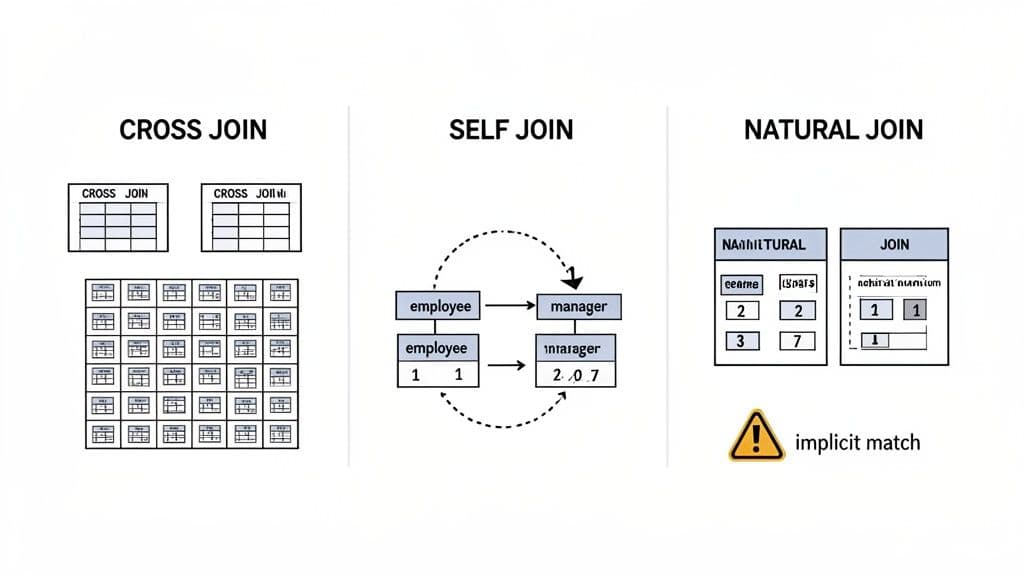
While INNER and OUTER joins are your daily workhorses, some situations call for a different approach. That's where you'll find a few less common, but incredibly useful, join types: CROSS JOIN, SELF JOIN, and NATURAL JOIN.
These aren't joins you'll write every day, but knowing when and how to use them can solve some tricky problems that standard joins just can't handle elegantly. Think of them as specialized tools in your SQL toolkit.
The CROSS JOIN for All Combinations
A CROSS JOIN generates a Cartesian product. In simple terms, it takes every single row from the first table and pairs it with every single row from the second. You don't use an ON clause here because you're not trying to match anything—you're just creating every possible combination.
If you join a table with 10 rows to another with 5 rows, you get 50 rows back (10 * 5). This is fantastic for things like generating test data or creating all possible variants of a product—like matching every t-shirt size with every available color.
Practical Example: Generating Product Variants
Imagine you have a sizes table with S, M, and L, and a colors table with Red and Blue. A CROSS JOIN is the perfect way to generate every combination for your inventory.
SELECT
    s.size_name,
    c.color_name
FROM
    sizes s
CROSS JOIN
    colors c;
This single query instantly produces a complete list of all product variants (S-Red, S-Blue, M-Red, etc.), which you could then use to populate an inventory table or a product creation script.
Actionable Insight: Use
CROSS JOINwhen you need to create a complete set of combinations from two independent lists. It's ideal for generating test data, fixtures for a report (like a list of all months for all departments), or creating a base table of all possible product variations.
The SELF JOIN for Hierarchical Data
A SELF JOIN isn't actually a new keyword but a technique: you join a table to itself. You accomplish this by giving the table two different aliases, which lets you treat it as two separate, related tables within the same query. It’s the standard solution for querying relational data stored within a single table, like an organizational chart.
The classic use case is an employees table where a manager_id column points back to another employee_id in the very same table. A SELF JOIN is how you can pull a clean list of employees and their corresponding managers' names.
Practical Example: Finding Employee-Manager Pairs
With an employees table, this query neatly pairs each employee with their direct manager.
SELECT
    e.employee_name,
    m.employee_name AS manager_name
FROM
    employees e
LEFT JOIN
    employees m ON e.manager_id = m.employee_id;
Here, we're joining employees (aliased as e for the employee) to itself (aliased as m for the manager). We use a LEFT JOIN to make sure employees without a manager, like the CEO, still appear in the results.
Actionable Insight: The
SELF JOINpattern is your solution for any table that references itself. This includes organizational charts, multi-level marketing referral chains, threaded forum comments (where a comment has aparent_comment_id), and category/subcategory structures.
A Warning About NATURAL JOIN
A NATURAL JOIN is a shorthand that automatically joins tables based on any and all columns that have the same name. You don’t write an ON clause; the database engine just assumes you want to join on every matching column name it finds.
Caution: I strongly recommend you avoid
NATURAL JOINin any production code. Its convenience is also its biggest weakness. The join condition is implicit, which means it can break silently. If a developer later adds a new column with a matching name to both tables (likecreated_at), the join logic will change without warning, leading to incorrect and unpredictable results.
For queries that are reliable and easy to maintain, always stick with an explicit INNER JOIN and a clear ON clause. It’s a few extra keystrokes that will save you from major headaches down the line.
Getting your JOIN syntax right is one thing, but getting the results you expect is another beast entirely. We've all been there: you write a query that looks perfect, but it returns a confusing mess of missing rows or, even more commonly, a mountain of duplicates.
Even seasoned pros get caught by these issues. Let's break down the most common SQL JOIN pitfalls and, more importantly, how to sidestep them.
The Problem of Duplicate Rows
One of the first "gotchas" everyone hits with JOINs is seeing way more rows than they anticipated. This almost always happens when you're joining tables with a one-to-many relationship.
Imagine you have a customers table and an orders table. If one customer has placed five orders, a simple join between the two will produce five rows for that single customer. While that's technically the correct behavior, it can seriously inflate counts and skew your aggregate functions.
Here’s how you can get it under control:
- Use
DISTINCT: If your goal is just to get a unique list of records—say, all customers who have placed at least one order—SELECT DISTINCTis your quickest fix. It simply filters out all the duplicate rows from your final result. - Use
GROUP BY: When you actually need to run calculations likeCOUNT(),SUM(), orAVG(),GROUP BYis the right tool for the job. It collapses those multiple rows into a single, neat summary row for each customer.
The Nuance of Joining on NULLs
Another common source of confusion is rows that seem to vanish into thin air. This is almost always because of NULL values in your join keys. Here's the critical rule in SQL: NULL is not equal to anything, not even another NULL.
This means that if you try to join two tables on a column that contains NULLs, an INNER JOIN will simply ignore those rows. They won't match.
NULL = NULLevaluates to unknown, notTRUE. Because of this, a standardONclause in anyINNERorOUTER JOINwill never match two rows where the join keys are bothNULL. This is by design, but it catches developers off guard all the time.
To get around this, you have to be more explicit. PostgreSQL, for instance, offers the IS NOT DISTINCT FROM operator, which cleverly treats two NULLs as if they were equal, allowing them to match.
Understanding Join Cardinality and Performance
The relationship between your tables, or their join cardinality, directly impacts both the size of your result set and your query's performance. Getting a handle on this is essential.
- One-to-One: One row in Table A matches at most one row in Table B. These joins are straightforward and fast.
- One-to-Many: One row in Table A can match many rows in Table B. This is the classic source of the "duplicate" rows we talked about earlier.
- Many-to-Many: Many rows in Table A can match many rows in Table B. Be extremely careful here. Without a proper linking table, you can easily create a Cartesian product that brings your database to its knees.
Defining these relationships with primary and foreign keys is the best way to maintain data integrity and ensure your joins behave predictably. To dive deeper, check out our guide on how to use PostgreSQL foreign keys to enforce these rules at the database level.
Practical SQL Join Performance and Optimization Tips
Getting your SQL join to return the correct data is one thing. Getting it to do so quickly is another challenge entirely. A poorly written join can slow an entire application to a crawl, but a few strategic tweaks can make your queries fly.
The biggest performance win you'll ever get with joins comes from creating indexes on your join keys. Think of an index as a pre-built lookup table for your database. Without one, the engine has to scan every single row to find matches. With an index, it can find the exact rows it needs almost instantly. The difference isn't small—for large tables, a good index can cut query times from minutes down to milliseconds.
Optimize Your Join Strategy
Once you have your indexes in place, you can fine-tune the query itself for even better performance. It all comes down to helping the database engine do less work.
-
Filter Early with
WHERE: Always try to reduce the amount of data you're joining before the join even happens. By applying aWHEREclause to each table, you give the database a much smaller set of rows to compare. This dramatically reduces memory and CPU usage. -
Choose the Right Join Type: Whenever you only need matching records, stick with
INNER JOIN. It's almost always faster than anOUTER JOINbecause it produces the smallest possible result set. Only useLEFTorFULLjoins when you specifically need to include rows that don't have a match. -
Avoid Functions on Join Columns: A classic performance killer is applying a function directly to a column in your
ONclause, likeON LOWER(t1.email) = LOWER(t2.email). This simple mistake prevents the database from using an index on that column, forcing a full table scan. If you need to clean or transform data, do it before the join.
By keeping these principles in mind, you'll be building queries that are not just correct but also incredibly efficient and ready to scale. To really nail this, take a look at our complete guide on how to create indexes in SQL and master this crucial skill.
Frequently Asked Questions About SQL Joins
As you get comfortable with SQL joins, a few common questions always seem to pop up. Moving from the textbook examples to real-world queries can expose some tricky spots. Let's clear up a few of the most frequent ones.
These aren't just theoretical answers; they're practical rules of thumb that will help you decide which join to use and how to structure your queries on the fly.
What Is the Difference Between a JOIN and a UNION?
This is a classic point of confusion, but the distinction is pretty simple. It all comes down to whether you're adding columns or adding rows.
A JOIN combines columns from different tables side-by-side. You use it when you want to enrich your data by pulling in related information from another table. Think of it as making your dataset wider.
A UNION, on the other hand, stacks rows from two or more queries on top of each other. It’s for combining similar types of data into a single, longer list. All the queries in a UNION need to have the same number of columns with data types that can work together.
Use a
JOINto add more information to existing rows. For example, get a user's name and their order details in one line. Use aUNIONto consolidate similar datasets. For example, combine active customers and inactive customers into a single list.
When Should I Use a LEFT JOIN vs an INNER JOIN?
The choice between a LEFT JOIN and an INNER JOIN hinges on one critical question: do you need to keep records that don't have a match?
-
Use an
INNER JOINwhen you only want to see records that have a match in both tables. This is your go-to for finding the intersection—like "Customers who have placed orders." It's often the most efficient choice because it filters out non-matches. -
Use a
LEFT JOINwhen you must keep every single row from the first (left) table, even if there's no corresponding entry in the second. It’s perfect for questions like, "Show me all customers, and if they have orders, show me those too."
A very common and powerful pattern is using a LEFT JOIN with a WHERE ... IS NULL clause. This lets you find records that exist in the left table but have no match in the right one.
How Do I Join Three or More Tables?
Joining multiple tables is just a matter of chaining your JOIN clauses together. Don't overthink it. You simply extend the logic from a two-table join, one step at a time.
The key is making sure that each new table you add has a logical connection to a table already in your query.
Let's say you want to link customers, orders, and products. The process is sequential:
- First,
JOINcustomerstoordersusingcustomer_id. - Then, take that result and
JOINit toproductsusingproduct_id.
SELECT
    c.customer_name,
    o.order_date,
    p.product_name
FROM
    customers c
INNER JOIN
    orders o ON c.customer_id = o.customer_id
INNER JOIN
    products p ON o.product_id = p.product_id;
This query builds the final result set piece by piece, connecting all three tables to give you the complete picture.
Need a tool that makes exploring and querying your data this easy across SQLite, PostgreSQL, and MySQL? TableOne is a modern, cross-platform database client designed for developers. Run queries, inspect table relationships, and manage your data with confidence. Check out TableOne today.


