Master the Foreign Key in PostgreSQL: A Practical Guide
Learn how to implement the foreign key in postgresql, enforce data integrity, and optimize constraints with real-world examples.

A foreign key is one of the most fundamental concepts in database design, but it's really just a formal way of creating a common-sense link between your data. It’s a rule you set in PostgreSQL that connects a column in one table to a primary key in another. This simple constraint is what prevents you from, say, adding an order for a customer who doesn't even exist. It builds a strong, reliable bridge between related pieces of information.
What Is a Foreign Key in PostgreSQL?
At its core, a foreign key acts as a logical link between two tables. Its main purpose is to enforce what’s known as referential integrity—a fancy term for making sure the relationships between your tables stay consistent and trustworthy.
Without this rule, your database could easily end up with "orphan" records. Think of an order that's still in your system, but the customer record it belonged to has been deleted. Who does the order belong to? Nobody. That's an orphan, and it's a data integrity nightmare.
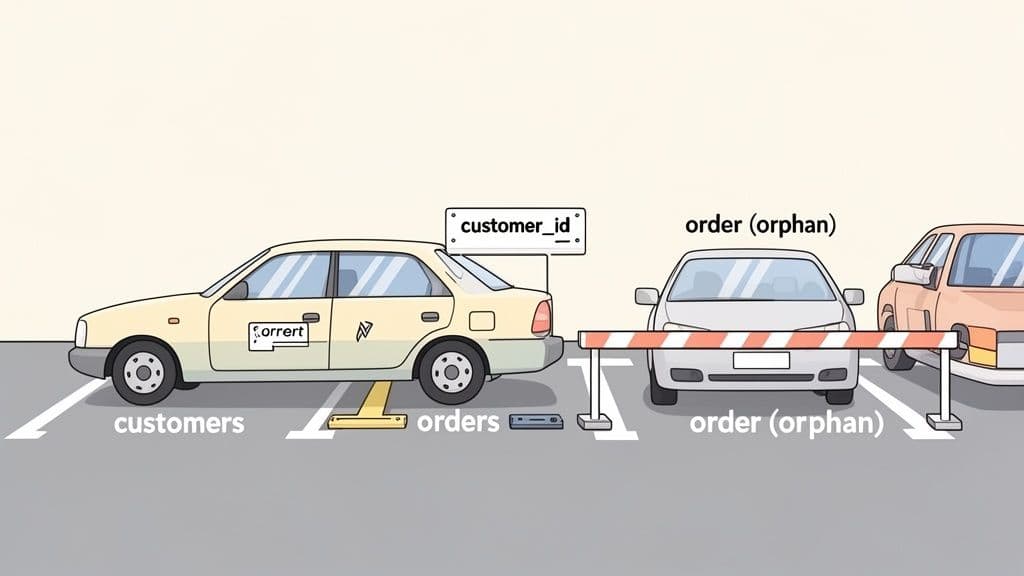
Let's make this concrete with a classic example: a customers table and an orders table. It’s a basic business rule that every single order must belong to a customer. A foreign key is the tool that makes the database itself enforce this rule.
-- First, the parent table with a primary key
CREATE TABLE customers (
    id SERIAL PRIMARY KEY,
    name VARCHAR(100) NOT NULL
);

-- Then, the child table with a foreign key
CREATE TABLE orders (
    order_id SERIAL PRIMARY KEY,
    customer_id INT,
    order_date DATE,
    FOREIGN KEY (customer_id) REFERENCES customers(id)
);

-- Let's add a customer
INSERT INTO customers (name) VALUES ('John Doe');
-- This works, because customer with id=1 exists.
INSERT INTO orders (customer_id, order_date) VALUES (1, '2023-10-27');

-- This will FAIL, because no customer with id=99 exists.
-- ERROR: insert or update on table "orders" violates foreign key constraint
INSERT INTO orders (customer_id, order_date) VALUES (99, '2023-10-28');
The foreign key constraint simply stops you from doing things that would break the logical link between tables. It's the database's way of saying, "Nope, you can't create an order for a customer that isn't in my records."
The Parent-Child Relationship
This connection is often called a parent-child relationship. It’s a helpful way to think about how the tables interact.
- Parent Table (Referenced Table): This is the table that contains the primary key being pointed to. In our example, the
customerstable is the parent. It holds the "master list" of all valid customer IDs. - Child Table (Referencing Table): This table holds the foreign key column that points back to the parent. The
orderstable is the child here, because itscustomer_idcolumn has to reference a real ID from thecustomerstable.
Building your schema this way is a cornerstone of good database design. It shifts the burden of data validation from your application code directly into the database, which makes your entire system more resilient and predictable. To get the full picture, you can learn more about its counterpart in our guide to understanding the primary key.
Foreign keys have been a staple of PostgreSQL since they were introduced way back in version 7.1 in 2001. Today, they're everywhere. A recent community survey of over 4,200 Postgres users found that foreign keys are used in 78% of relational schemas in enterprise environments.
When you define a constraint like FOREIGN KEY (customer_id) REFERENCES customers(id), you’re creating a guarantee. Any attempt to insert an order with a non-existent customer_id will fail immediately, protecting your data's integrity right at the source. For a deeper dive, the official PostgreSQL documentation on constraints is an excellent resource.
How to Create and Manage Foreign Keys
Now that we have a solid grasp of why foreign keys are so important, let's get our hands dirty with the actual SQL. When you're building or tweaking a database schema, you'll constantly be working with these relationships. It really boils down to three main tasks: creating them, adding them to existing tables, and, when necessary, removing them.
Here’s a pro tip right from the start: always explicitly name your constraints. If you don’t, PostgreSQL will generate one for you, and you'll end up with something like orders_customer_id_fkey. A month from now, will you remember what that does? Probably not. A clear, descriptive name like fk_employees_departments makes everything from debugging to schema migrations a whole lot easier.
Defining a Foreign Key During Table Creation
The most natural time to set up a foreign key is right when you're creating a new table. This is the cleanest way to do it, baking the relationship directly into the table's structure from day one. Let's walk through a classic example: employees and the departments they belong to.
First, we need our "parent" table, departments. The id column here is the primary key that our employees table will point to.
CREATE TABLE departments (
    id SERIAL PRIMARY KEY,
    name VARCHAR(100) NOT NULL
);
With the departments table in place, we can now create the "child" table, employees. We'll add a department_id column and then immediately define the foreign key that links it back to departments.
CREATE TABLE employees (
    id SERIAL PRIMARY KEY,
    first_name VARCHAR(50),
    last_name VARCHAR(50),
    department_id INT,

    CONSTRAINT fk_employees_departments
        FOREIGN KEY(department_id)
        REFERENCES departments(id)
);
That CONSTRAINT fk_employees_departments block is where the magic happens. It tells PostgreSQL that any value inserted into employees.department_id must already exist in the departments.id column. Simple as that.
Adding a Foreign Key to an Existing Table
Let's be realistic—schemas evolve. It's rare to get everything perfect on the first try. You’ll often find yourself needing to add a foreign key to a table that’s already up and running with data in it. For that, we turn to the ALTER TABLE command.
Imagine we built our employees table but forgot the foreign key constraint. No big deal, we can add it after the fact.
ALTER TABLE employees
ADD CONSTRAINT fk_employees_departments
FOREIGN KEY (department_id)
REFERENCES departments(id);
This command modifies the employees table structure to enforce the new rule. But there’s a catch. If your employees table has any rows where the department_id doesn't match an existing ID in the departments table, PostgreSQL will throw an error and refuse to add the constraint. You have to clean up those "orphan" records first before the relationship can be established. For a deeper dive into modifying tables, check out our guide on the PostgreSQL ALTER TABLE command.
Removing a Foreign Key Constraint
Just as you might add constraints, you'll sometimes need to remove them. Maybe you're redesigning a part of your application or refactoring the database schema entirely. Dropping a constraint is also done with ALTER TABLE, and this is where giving your constraints good names really pays off.
To get rid of the foreign key we just created, the command is beautifully simple.
ALTER TABLE employees
DROP CONSTRAINT fk_employees_departments;
Actionable Insight: Before dropping a foreign key in a production environment, it's wise to first make the constraint
NOT VALID. This tells PostgreSQL to stop enforcing it for new data but keeps the constraint object itself. This can prevent long-running locks during theDROPoperation on a busy table. You can do this withALTER TABLE employees VALIDATE CONSTRAINT fk_employees_departments;andALTER TABLE employees DROP CONSTRAINT fk_employees_departments;in separate transactions.
Because we used a clear, predictable name, the process is clean. If we had let PostgreSQL name it, we'd first have to dig through system catalogs to find the generated name before we could even think about dropping it. A little foresight goes a long way.
Automating Data Rules with Referential Actions
A foreign key is a fantastic guardrail, but its default setting is purely defensive. Out of the box, PostgreSQL will stop you from deleting or updating a parent row if any child rows are pointing to it. This is a safe starting point, but what if you want the database to be smarter? What if you want it to handle these situations automatically?
This is exactly where referential actions like ON DELETE and ON UPDATE come into play. They let you bake your business rules right into the database schema, telling PostgreSQL how to maintain data integrity when related records change. Instead of cluttering your application code with cleanup logic, you can build a more predictable and robust system at the database level.
The lifecycle of managing these constraints, from creation to modification, is a core part of database design.
 This workflow shows how you can progressively add more intelligent rules to your foreign keys as your application's needs evolve.
Deleting Related Data with ON DELETE CASCADE
One of the most powerful—and most common—referential actions is CASCADE. When you set ON DELETE CASCADE, you're giving PostgreSQL a clear command: "If this parent row gets deleted, automatically delete every child row that references it."
Think about a classic blog with a posts table and a comments table. A comment is useless without the post it belongs to. If you delete a post, you definitely want all its associated comments to disappear as well.
Here’s how you’d set that up:
CREATE TABLE posts (
    id SERIAL PRIMARY KEY,
    title TEXT NOT NULL,
    content TEXT
);

CREATE TABLE comments (
    id SERIAL PRIMARY KEY,
    post_id INT NOT NULL,
    comment_text TEXT,

    CONSTRAINT fk_comments_posts
        FOREIGN KEY (post_id)
        REFERENCES posts(id)
        ON DELETE CASCADE
);
With this rule in place, running DELETE FROM posts WHERE id = 123; doesn’t just remove the post. It also triggers a clean, cascading delete of every single comment where post_id was 123.
Use this one with caution!
ON DELETE CASCADEis incredibly handy, but it can be dangerous. A singleDELETEcommand can set off a chain reaction, potentially wiping out thousands of rows across multiple tables if you haven't thought through the relationships. Always be absolutely certain this is the behavior you want.
Unlinking Records with ON DELETE SET NULL
Sometimes, deleting child records is way too aggressive. You might want to keep the record but simply break its link to the now-deleted parent. This is the perfect job for ON DELETE SET NULL. This action tells PostgreSQL to update the foreign key column in the child table to NULL when its parent row is removed.
There's one critical requirement: for this to work, the foreign key column in the child table must be nullable.
Imagine you have an employees table and a projects table. If a project gets canceled and deleted from the database, you almost certainly don't want to delete the employee records along with it. A better approach is to simply un-assign them from that project.
CREATE TABLE projects (
    id SERIAL PRIMARY KEY,
    project_name VARCHAR(100) NOT NULL
);

CREATE TABLE employees (
    id SERIAL PRIMARY KEY,
    employee_name VARCHAR(100),
    project_id INT, -- Notice: this column allows NULLs

    CONSTRAINT fk_employees_projects
        FOREIGN KEY (project_id)
        REFERENCES projects(id)
        ON DELETE SET NULL
);
Now, if you run DELETE FROM projects WHERE project_name = 'Project Phoenix';, any employee assigned to that project will have their project_id field automatically set to NULL. Their records are safe, but the association is cleanly severed.
Protecting Data with RESTRICT and NO ACTION
Finally, we have the most conservative options, which act as important safeguards for your data.
-
NO ACTION(The Default): This is PostgreSQL's standard behavior. It checks for violations at the end of the transaction. If you delete a parent row but, say, reassign its children to another parent within the same transaction, everything is fine. But if any referencing rows still exist when the transaction commits, it throws an error. -
RESTRICT: This is almost identical toNO ACTION, but it’s stricter. It performs the check immediately. The moment you try to delete a parent row that has children, the command fails right away.
In day-to-day use, their effect is often the same: they stop you from orphaning child records. Using ON DELETE RESTRICT explicitly is great for critical data where accidental deletion would be a disaster, as it forces the application to deal with the child records first before it can remove the parent.
PostgreSQL Foreign Key Referential Actions Compared
A quick reference guide comparing the behavior of ON DELETE and ON UPDATE actions to help you choose the right one for your use case.
| Action | Behavior on Parent Key Deletion/Update | Common Use Case |
|---|---|---|
| NO ACTION (Default) | Throws an error at the end of the transaction if the child row still references a non-existent parent. | General-purpose safety net. Useful in complex transactions where child rows might be reassigned before commit. |
| RESTRICT | Throws an error immediately upon attempting to delete/update the parent key. | Protecting critical data. Ensures no parent record can be removed while dependencies exist, forcing explicit handling. |
| CASCADE | Deletes or updates the referencing child rows automatically along with the parent. | Tightly-coupled data where the child has no meaning without the parent (e.g., comments on a post). |
| SET NULL | Sets the foreign key column(s) in the child row to NULL. The child column must be nullable. | Optional relationships. Un-assigning a child from a parent without deleting the child record (e.g., an employee from a project). |
| SET DEFAULT | Sets the foreign key column(s) in the child row to their default value. The child column must have a default value. | Re-assigning a child to a "default" or "unassigned" parent record automatically. |
Choosing the right referential action is all about encoding your application's business logic directly into the database, making your data model more resilient and easier to manage.
Avoiding the Foreign Key Performance Trap
Foreign keys are the unsung heroes of data integrity in PostgreSQL. They're the glue that holds your relational schema together, ensuring the connections between your tables make sense. But this trusty feature can hide a nasty performance trap, one that often doesn't show its face until it's too late. The problem isn't the foreign key itself, but what happens when you forget to give it a crucial partner: an index.
This is a classic "it works on my machine" problem. When your tables are small during development, everything feels snappy. The real pain starts after you go live and your tables balloon to millions of rows. Suddenly, routine operations like deleting a user or updating a product category can bring your entire system to a crawl. Nine times out of ten, the culprit is a full table scan triggered by an unindexed foreign key.
 This image perfectly captures the difference. On the left, you have the database slogging through every single row. On the right, it zips directly to the data it needs. That's the power of an index.
The Problem With Unindexed Foreign Keys
Let's walk through a common scenario. You have a users table and a posts table, where posts.user_id is a foreign key pointing to users.id. Now, imagine you need to delete a single, long-inactive user from your system.
When you run DELETE FROM users WHERE id = 123;, PostgreSQL can't just blindly remove the row. It has a job to do: uphold the foreign key constraint. This means it must first check the posts table to see if any records are linked to user_id 123.
Without an index on posts.user_id, Postgres has only one, brutally inefficient way to do this: read every single row in the posts table. This is called a sequential scan.
The database is basically asking, "Does any post in this massive pile belong to user 123?" and then sifting through the entire pile, one record at a time, to find out. Even if that user never wrote a single post, the database still has to check everything just to be certain. This same expensive scan also kicks in for UPDATE operations on the parent key.
The Dramatic Impact of Adding an Index
Fortunately, the fix is incredibly simple: add an index to the foreign key column in the child table. Think of an index as a hyper-efficient address book for your data. It lets PostgreSQL find all related child records almost instantly, without having to read the whole table.
Let's create that index for our posts table:
CREATE INDEX idx_posts_on_user_id ON posts(user_id);
With this index in place, when you try to delete that same user, PostgreSQL uses it to immediately confirm whether any posts exist for that user_id. The operation transforms from a slow, painful marathon into a lightning-fast sprint.
The performance gains aren't just marginal; we're talking orders of magnitude. In fact, benchmark tests show that forgetting to index foreign keys can be catastrophic. One such test clocked a DELETE operation on a single row at a painful 154 milliseconds due to a full table scan. After adding a simple index, the exact same operation finished in just 0.751 milliseconds. That's a staggering 99.8% reduction in execution time. You can read more about these findings and why indexing your foreign keys is a non-negotiable best practice.
Actionable Insight: Make indexing foreign keys a default part of your workflow. When you write a
CREATE TABLEstatement with aFOREIGN KEY, immediately follow it with aCREATE INDEXstatement for that same column. This habit will save you from significant performance headaches down the line. It's one of the most effective optimizations you can make.
Advanced Foreign Key Strategies and Pitfalls
Once you've got the basics down, you’ll find that a PostgreSQL foreign key can do a lot more than just link two columns together. As your application’s logic gets more complex, your data model will have to keep up. This is where you start needing more advanced strategies to enforce sophisticated business rules right inside the database.
But with great power comes great responsibility. These features also open the door to new problems. From cascading deletes that spiral out of control to subtle deadlocks that tank performance, understanding the pitfalls is just as important as learning the syntax. Getting a handle on these topics will help you build a database that's both powerful and stable.
Working with Composite Foreign Keys
Sometimes, the link between two tables isn't a single column—it's a combination of them. That's when you'll reach for a composite foreign key. This lets you build a relationship that requires a set of columns in the child table to match a corresponding set in the parent table.
Think about a system for tracking items in an order. You might have an order_items table that needs to reference not just a product_id but also a category_id from a products table. This is common when the primary key of the parent table is itself a composite.
Here’s what that looks like in practice:
CREATE TABLE products (
    product_id INT,
    category_id INT,
    product_name VARCHAR(255) NOT NULL,
    PRIMARY KEY (product_id, category_id) -- A composite primary key
);

CREATE TABLE order_items (
    order_id INT,
    product_id INT,
    category_id INT,
    quantity INT,
    PRIMARY KEY (order_id, product_id, category_id),

    CONSTRAINT fk_order_items_products
        FOREIGN KEY (product_id, category_id)
        REFERENCES products (product_id, category_id)
);
In this setup, the fk_order_items_products constraint ensures that any (product_id, category_id) pair you insert into order_items already exists as a primary key in the products table.
Using Deferrable Constraints for Complex Transactions
By default, PostgreSQL checks foreign key constraints the moment a statement finishes running. Most of the time, this is exactly what you want. But it can cause headaches in tricky transactions, especially when you have circular dependencies—like needing to insert a parent and a child record at the same time.
This is the perfect job for deferrable constraints. When you mark a constraint as DEFERRABLE INITIALLY DEFERRED, you're telling PostgreSQL to wait and check the rule only when the entire transaction is about to commit.
Imagine you have employees and teams tables. Every team needs a leader (an employee), and every employee has to be on a team. It's a classic chicken-and-egg problem.
ALTER TABLE teams
ADD CONSTRAINT fk_teams_employees
FOREIGN KEY (team_leader_id) REFERENCES employees(id)
DEFERRABLE INITIALLY DEFERRED;

-- Now you can run this transaction without an error:
BEGIN;
-- Insert a new team, the leader doesn't exist yet, but the check is deferred
INSERT INTO teams (id, team_name, team_leader_id) VALUES (10, 'New Team', 101);
-- Insert the new employee who will be the leader
INSERT INTO employees (id, name, team_id) VALUES (101, 'New Leader', 10);
COMMIT; -- The check happens here, and all is well.
With this deferred check, PostgreSQL won't complain until the final COMMIT, giving you the flexibility to resolve the circular dependency within a single transaction.
Common Pitfalls and How to Avoid Them
As useful as these advanced features are, they can cause serious trouble if you're not careful. The two biggest issues I see are runaway cascading deletes and performance-killing table locks.
Actionable Insight: Before implementing
ON DELETE CASCADE, always map out your cascade paths. Ask yourself, "If I delete a row from Table A, what rows in Table B will be deleted? And what rows in Table C will be deleted because of that?" Use this feature sparingly, especially with critical data. For less critical relationships, consider using a soft-delete pattern in your application instead.
Foreign keys also add performance overhead. While they're great for integrity, these checks can slow down INSERT, UPDATE, and DELETE operations by 20-50% in systems with heavy workloads. In one benchmark, a simple delete took 250 ms because of full table scans for constraint checks. After optimization, that time dropped to just 2 ms—a 125x improvement. You can discover more insights about these performance benchmarks on chat2db.ai.
To sidestep these issues, think twice before implementing deep cascades. It’s also a good idea to batch your delete or update operations when possible to reduce the overhead from locking. This way, you can keep your data clean without grinding your database to a halt.
Visualizing and Managing Relationships with TableOne
While knowing your way around SQL is non-negotiable, let's be honest: managing a complex schema with just a command-line interface can feel like navigating a maze blindfolded. This is especially true when dealing with a foreign key in PostgreSQL, where a single change can have ripple effects you didn't see coming.
This is exactly where a good visual database client comes in. Tools like TableOne let you connect to your PostgreSQL database—whether it's on your local machine or a managed service like Neon or Supabase—and see your entire schema as a graphical map. It’s not just for looks; it's a dynamic workspace that helps you instantly grasp how your tables are wired together.
See Dependencies and Spot Problems Instantly
One of the biggest wins of using a GUI is how easily you can trace relationships. Instead of writing queries to hunt down dependencies, you can just click on a table and immediately see every other table that points to it. This makes it so much easier to figure out the real-world impact of deleting a row or changing a schema.
A huge, often overlooked performance killer is a missing index on a foreign key column. A visual tool can flag these for you automatically, turning a painstaking manual audit into a simple, one-click check. It’s a real time-saver.
Work Smarter and Safer
Beyond just looking at your schema, a smart client helps you avoid making mistakes in the first place. When you're editing data directly in a table view, the tool should understand and enforce your database's rules. That means it won't let you punch in a customer_id that doesn't actually exist in the customers table, catching the error before it becomes a problem.
This kind of built-in safety net is incredibly powerful. It helps you:
- Compare schemas side-by-side to catch differences between your development and production environments.
- Trace data lineage to see exactly how information flows through your application.
- Edit data with confidence, knowing that all the underlying constraints are being respected.
By pairing your SQL skills with an efficient visual tool, you get the best of both worlds. You can manage your PostgreSQL foreign keys with far more speed and a lot less guesswork, leading to more robust and reliable applications.
Common Questions About PostgreSQL Foreign Keys
When you start working with foreign keys in PostgreSQL, a few common questions always seem to pop up. Let's tackle them head-on with some practical, real-world answers.
Should I Index Every Foreign Key?
Yes. Just do it. An unindexed foreign key is a classic performance bottleneck waiting to happen.
Think about it: when you update or delete a row in the "parent" table, PostgreSQL has to run a check on the "child" table to look for any related rows. Without an index on that foreign key column, Postgres is forced to scan the entire child table. That's fine when the table is small, but it becomes agonizingly slow as your data grows.
Actionable Insight: As a rule of thumb, always create an index on your foreign key columns. It's probably the single most effective thing you can do to keep your database running smoothly as your application scales. Make it a habit:
FOREIGN KEYis almost always followed byCREATE INDEX.
What's the Real Difference Between RESTRICT and NO ACTION?
Honestly, their behavior is nearly identical—both stop you from creating orphaned records. The key difference is timing: when PostgreSQL actually performs the check within a transaction.
- RESTRICT: This one is immediate. The moment you try to delete a parent row that still has child rows pointing to it, the command fails. No ifs, ands, or buts.
- NO ACTION (the default): This one waits until the end of the transaction. This gives you a bit of breathing room. You could, for instance, delete a parent row and then, in the same transaction, update its old child rows to point to a new parent before you commit.
For most day-to-day work, the default NO ACTION is perfectly fine. RESTRICT is just a bit stricter and more immediate.
Can a Foreign Key Column Contain NULLs?
Absolutely, and it's a very useful feature for modeling optional relationships.
A classic example is an employees table with a manager_id foreign key. What about the CEO? They don't have a manager. In that case, their manager_id would simply be NULL. This pattern allows you to represent relationships that don't always exist.
It's also a requirement for using the ON DELETE SET NULL action, which is a clean way to handle deletions by simply nullifying the link instead of deleting the entire child row.
Why Is My ALTER TABLE to Add a Foreign Key Failing?
This almost always happens for one reason: you have existing data that violates the new rule you're trying to add.
If you're adding a foreign key to a table that already has data, PostgreSQL will check every single row to make sure the constraint holds. If it finds even one "orphan" row—a child record whose key points to a parent ID that doesn't exist—it will throw an error and refuse to create the constraint.
To fix it, you have to clean up your data first. You can find these orphan rows with a query like this:
SELECT c.*
FROM child_table c
LEFT JOIN parent_table p ON c.parent_id = p.id
WHERE p.id IS NULL;
Once you identify the bad rows, you'll need to either delete them or update their foreign key columns to point to a valid parent record.
Keeping track of all these relationships and making sure your schema is in top shape is so much easier with the right tool. TableOne provides a clear, visual map of your database, allowing you to quickly inspect foreign keys, catch missing indexes, and manage your data with confidence. Download the free trial of TableOne and see how much simpler your database workflow can be.


