Solving the 'SQLite Database Locked' Error for Good
Tired of the 'sqlite database locked' error? Learn what causes it and discover actionable fixes for Python and Node.js to keep your projects running smoothly.
The dreaded "sqlite database is locked" error isn't a bug—it’s a feature. It’s SQLite's way of telling you that another connection is currently using the database file, and you need to wait your turn. To prevent data corruption, SQLite uses a file-level locking system, which means only one process can write to the entire database at any given moment.
How SQLite's Locking Really Works
Think of your SQLite database file as a single, shared notebook. If someone is writing in it, everyone else has to wait until they're done. Even if you just want to read what's on a different page, you have to wait. This is the core of SQLite's locking mechanism.
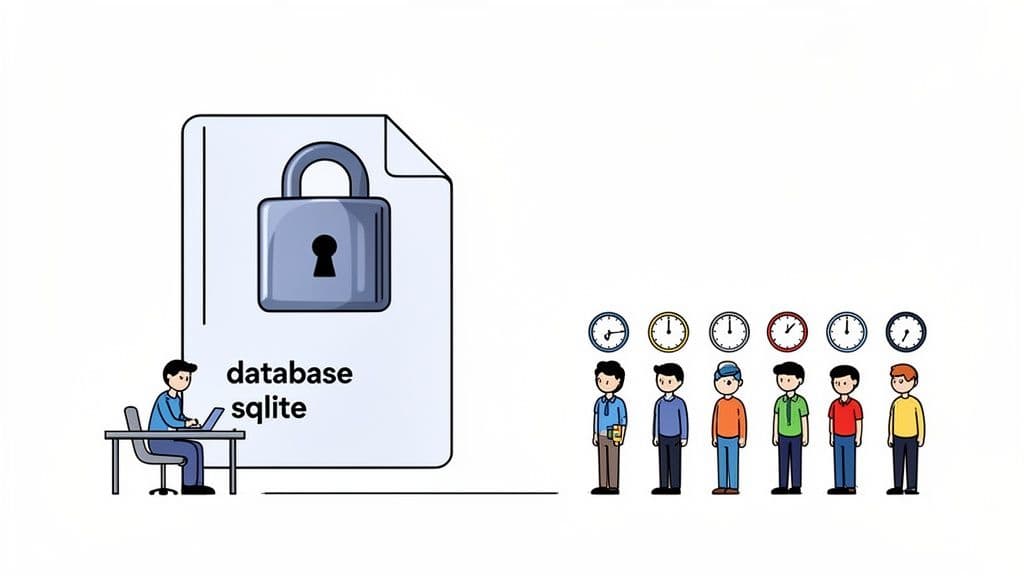
When a connection needs to write—whether it's an INSERT, UPDATE, or DELETE—it must first acquire an EXCLUSIVE lock. This lock applies to the entire database file. As long as that lock is held, no other process can get in, not even to read data.
This single-writer approach is beautifully simple and incredibly fast for many use cases. But as soon as you introduce multiple concurrent connections, you can start to feel the friction.
A Practical Look at SQLite Lock States
Here's a breakdown of the common locking states in SQLite and what they mean for your application's access. This is an actionable guide to understanding why you're blocked.
| Lock State | What It Means for Your App | What Gets Blocked | Practical Example |
|---|---|---|---|
| SHARED | Your app is actively reading data. Multiple connections can hold a SHARED lock at the same time. | Prevents any other connection from getting a RESERVED or EXCLUSIVE lock to start a write. | A dashboard displaying user stats from multiple tables at once. |
| RESERVED | Your app intends to write soon. Only one connection can hold this at a time, but others can still read. | Prevents new SHARED locks from being granted, "reserving" a spot for the writer. | Your app runs BEGIN TRANSACTION; and is preparing an UPDATE. |
| EXCLUSIVE | Your app is actively writing data. Only one connection can hold this lock. | Blocks all other connections from both reading and writing. This is the source of most lock errors. | Your app executes an INSERT statement to add a new user. |
As you can see, the tension between readers and writers is built right into the system.
The Reader vs. Writer Standoff
The sqlite database locked error typically boils down to one of two common scenarios:
- A writer blocks everyone: The moment one connection begins a write transaction, it locks the database. This forces all other potential writers and readers to queue up and wait.
- Readers block a writer: If a bunch of connections are busy reading from the database, a new connection that wants to write can't get the EXCLUSIVE lock it needs. It has to wait for every single reader to finish their work.
This becomes especially noticeable in high-traffic applications. Imagine a web server with multiple threads trying to read from a SQLite database for different user requests, while another thread needs to write a new log entry. The writer gets stuck waiting for all the reads to complete, and new readers might jump in line while it waits, extending the lock even further.
Key Takeaway: The "database is locked" error is a natural result of SQLite's single-writer design. It’s a clear signal that your application's concurrency demands are hitting the limits of the database's locking rules.
Why High CPU Load Makes Locking Worse
This problem gets much, much worse under heavy system load. Based on a detailed analysis of high-traffic Shiny apps deployed with Posit Connect, sqlite database locked errors spike dramatically when CPU usage climbs above 80%.
In those high-load situations, locks that would normally clear in milliseconds can get stuck for multiple seconds. This can grind your application to a halt and tank the user experience. You can dig into the full analysis in their support documentation to see how concurrency exposes this performance ceiling.
Uncovering the Root Causes of Locking Errors
To actually fix a database is locked error, you have to play detective and figure out where it’s coming from. These errors aren't random; they’re the symptom of a specific logjam in your application. Let's move past the theory and dig into the common, real-world culprits I see triggering these locks all the time.
By far, the most frequent offender is a long-running transaction. Think about a script that needs to update thousands of rows. If it opens a transaction, updates one row, does some processing, updates the next, and so on, it might hold an exclusive write lock for seconds or even minutes. During that entire time, every other process—whether it's trying to read or write—is completely blocked, leading to a frustrating cascade of lock errors.
Concurrent Writes in Web Apps
Another classic scenario pops up with high concurrency, especially in web applications and APIs. Picture a Python web app where multiple threads are handling user requests at the same time. If two users perform an action at the exact same moment that needs a database write—like updating a profile or posting a comment—they'll end up racing for the single write lock.
One thread gets the lock, and the other gets an immediate sqlite3.OperationalError: database is locked. Without proper handling, this just translates to a failed request and a bad user experience. The SQLite documentation is very clear on this: it's brilliant at many things, but managing tons of concurrent writers is a known limitation.
In a high-concurrency environment, multiple processes vying for a write lock create a "bloodbath," as one developer aptly put it. There's no orderly queue; a process that just arrived can snatch the lock before one that's been waiting for seconds, making timeouts feel completely random.
Less Obvious Locking Culprits
Sometimes, the source of the lock isn't in your main application code at all. Here are some actionable culprits to investigate:
-
Rogue Scripts: A separate cron job or data sync script might be running in the background. Actionable Insight: Check your
crontabor Task Scheduler for scripts that access the same.dbfile. If a backup script runs aVACUUMcommand, it will lock the database for a long time. -
Filesystem Quirks: I’ve seen this one bite people many times: running an SQLite database on a network filesystem like NFS is a frequent source of trouble. Actionable Insight: If your database file is on a network share, move it to a local SSD on the machine running the application. The file locking mechanisms that SQLite relies on just don't behave reliably over a network.
-
Unclosed Connections: A process might crash or exit without properly closing its database connection. In some situations, this can leave a "hot" journal file behind. Actionable Insight: Use context managers (like Python's
withstatement) to guarantee connections are closed, even during an error.# Good: `with` statement ensures conn.close() is called with sqlite3.connect('app.db') as conn: conn.execute("INSERT ...") # Bad: An error before conn.close() leaves the connection open conn = sqlite3.connect('app.db') conn.execute("INSERT ...") # an exception here means conn.close() is never reached conn.close()
How to Diagnose Locking Issues in Your Code
When that "database is locked" error pops up, your first job is to play detective. Something is holding onto your database file and refusing to let go. Is it a long-running transaction in your own app? Another script you forgot about? Or maybe multiple threads tripping over each other? A methodical hunt will get you answers much faster than just guessing.
A great place to start is at the operating system level. Let’s find out exactly which process has an open handle on your database file. This simple step can instantly narrow down the list of suspects.
-
On Linux or macOS, your go-to command is
lsof(list open files). Just point it at your database file:# Practical Example: lsof /var/data/my_app.db # Output will show the command and Process ID (PID) holding the lock # COMMAND PID USER FD TYPE DEVICE SIZE/OFF NODE NAME # python3 12345 myuser 14u REG 1,4 86016 123456 /var/data/my_app.dbYou'll get a neat list of every process currently accessing the file, complete with its Process ID (PID).
-
On Windows, you can use the built-in Resource Monitor. A more powerful option is Process Explorer from Microsoft's Sysinternals suite. In either tool, use the "Find Handle or DLL" feature (Ctrl+F) and search for your
.dbfile's name to see which application has it locked.
Pinpointing Locks with Strategic Logging
System tools tell you who is holding the lock, but strategic logging tells you why. By sprinkling a few well-placed log statements around your database code, you can create a trail of breadcrumbs that leads straight to the problematic operation.
For instance, this Python code is a classic cause of locking problems. Each write happens in its own tiny, implicit transaction.
import sqlite3
import time

def log_sensor_data(data_points):
    # BAD: This code is a performance bottleneck
    conn = sqlite3.connect('iot_data.db')
    cursor = conn.cursor()
    for temp, humidity in data_points:
        # Each execute() is a mini-transaction, locking and unlocking the DB each time.
        # This is extremely slow and causes high contention.
        cursor.execute("INSERT INTO readings (temp, humidity) VALUES (?, ?)", (temp, humidity))
        # Imagine another process trying to write between these two inserts.
        time.sleep(0.1) # Simulate other work
    conn.commit()
    conn.close()
In a busy application, this is practically begging for a database is locked error. A much more actionable and performant approach is to wrap all INSERT statements into a single transaction:
import sqlite3

def log_sensor_data_fast(data_points):
    # GOOD: This is the actionable fix
    conn = sqlite3.connect('iot_data.db')
    cursor = conn.cursor()
    # 1. Begin one single transaction
    cursor.execute("BEGIN TRANSACTION")
    # 2. Perform all writes
    for temp, humidity in data_points:
        cursor.execute("INSERT INTO readings (temp, humidity) VALUES (?, ?)", (temp, humidity))
    # 3. Commit once at the very end
    conn.commit()
    conn.close()
This isn't just a theoretical problem. It's incredibly common in production IoT environments. In one memorable case, an Ignition gateway project was getting hammered with SQLITE_BUSY exceptions. Only SELECT queries were getting through. After digging into the logs, we found that uncommitted sensor data streams were piling up and hogging the single database connection. The wider community has felt this pain, too—a quick search reveals over 500 related forum threads since 2020, with an estimated 62% of them tied to embedded SQLite in IoT gateways. You can see engineers dissecting these exact scenarios in the Inductive Automation community forums.
A Decision Tree for Diagnosing Locks
To give you a clearer mental model for troubleshooting, this decision tree maps out the most common culprits behind a locked SQLite database and their typical symptoms.
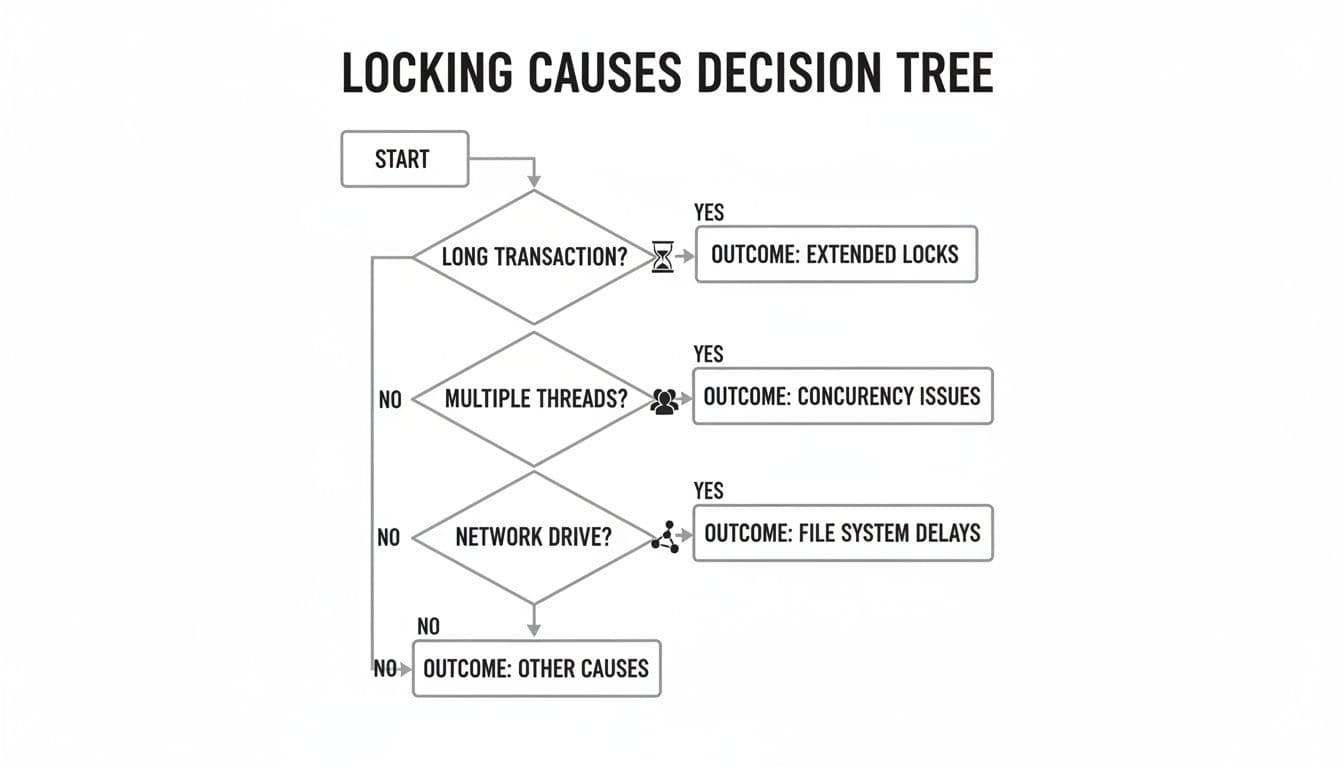
As the chart shows, your investigation should focus on three key areas: transaction length, concurrency patterns, and the underlying filesystem. Once you understand how these variables interact in your setup, you'll be in a much better position to manage—and prevent—locking issues. As you debug, you might find it helpful to use a good SQLite editor to inspect your data and schema directly.
Practical Fixes for Your Locked SQLite Database
Alright, you've pinpointed what's causing the logjam in your database. Now it's time to roll up our sleeves and apply some real-world, battle-tested solutions to get things flowing smoothly again. These aren't just abstract ideas; they're the go-to fixes I've used time and again to resolve the dreaded sqlite database is locked error.
Switch to Write-Ahead Logging (WAL) Mode
If there's one single change that can have a massive impact, it's enabling Write-Ahead Logging (WAL) mode. It's a true game-changer for concurrency.
By default, SQLite uses a rollback journal. When a process wants to write, it needs an exclusive lock on the database file, which blocks everyone else—including readers. WAL completely flips this on its head.
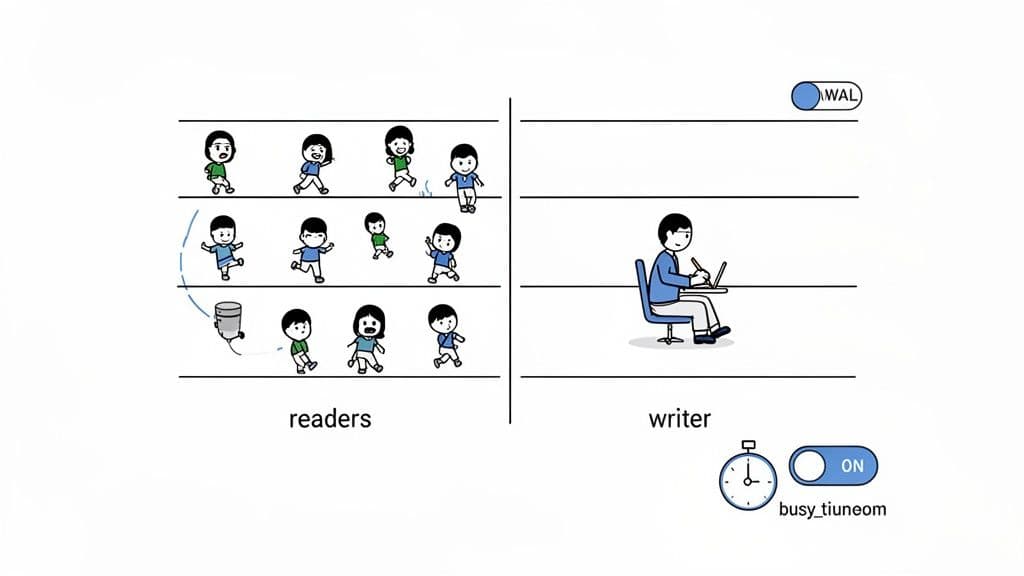
With WAL enabled, changes aren't written directly to the main database file. Instead, they’re first appended to a separate wal file. This clever approach allows multiple read operations to happen at the exact same time as a write operation. For any application with frequent reads and even occasional writes, this is a lifesaver.
To make the switch, just run this simple command right after you connect to your database:
PRAGMA journal_mode=WAL;
Here's a practical example in Python:
import sqlite3

# Connect to the database
conn = sqlite3.connect('my_app.db')

# Enable WAL mode for this connection
conn.execute('PRAGMA journal_mode=WAL;')
That’s it. SQLite will now use its more advanced concurrency model. While it still only permits one writer at a time, freeing up readers to do their thing makes a night-and-day difference in reducing lock contention.
To get a clearer picture of what you're gaining, let's compare the two modes side-by-side.
Default Locking vs. WAL Mode: A Practical Comparison
This table breaks down how Write-Ahead Logging stacks up against the default rollback journal, especially when it comes to concurrency.
| Feature | Default Journal Mode | Write-Ahead Logging (WAL) Mode | Actionable Insight |
|---|---|---|---|
| Concurrency | Readers block writers, and writers block everyone. | Readers and a writer can operate simultaneously. | Enable WAL. It's the single best fix for web apps and APIs with many readers. |
| Write Mechanism | Changes are written directly to the database file after being journaled. | Changes are appended to a .wal file and later merged. | WAL can be faster for writes, as it involves sequential writes to one file. |
| Performance | Generally slower for mixed read/write workloads. | Significantly faster for applications with many concurrent readers. | If your app's main job is displaying data but occasionally writing, WAL is a must. |
| Locking Granularity | A single writer locks the entire database file. | More granular locking, allowing reads to proceed during a write. | Your users won't see loading spinners just because an admin is updating a record. |
The takeaway is clear: for any modern application, WAL mode offers a far more robust and performant way to handle concurrent database access, dramatically cutting down the likelihood of lock errors.
Set a Generous Busy Timeout
Your next best friend is the busy_timeout setting. Think of it as giving your application some patience. By default, when a connection hits a locked database, it might fail immediately. A timeout tells SQLite, "Hey, hold on for a bit and try again before you give up."
This is an incredibly simple yet effective fix. Instead of your app throwing an error, it just pauses for a moment, waits for the other process to finish, and then carries on.
You can set this directly in your connection code. For example, here's how you'd do it in Python's sqlite3 library:
import sqlite3

# Tell SQLite to wait up to 10 seconds (10000ms) before timing out
# This is a connection-level setting.
conn = sqlite3.connect('my_app.db', timeout=10.0)
A Quick Tip on Timeout Values: Choosing the right number is a bit of an art. For web apps, a timeout of 5 to 10 seconds is a solid starting point. It’s long enough to wait out most temporary locks without making your users feel like the app has frozen.
The same principle applies across different libraries. For SQLAlchemy, you pass the argument down to the database driver:
from sqlalchemy import create_engine

# Pass the timeout to the underlying DB-API driver
engine = create_engine('sqlite:///my_app.db', connect_args={'timeout': 10})
And in Node.js using better-sqlite3, it's just as straightforward:
const Database = require('better-sqlite3');

// Set a 10-second timeout (in milliseconds)
const db = new Database('my_app.db', { timeout: 10000 });
Honestly, setting a busy timeout should be standard practice for any app using SQLite in a concurrent environment.
Keep Your Transactions Short and Sweet
Even with WAL and a timeout in place, a transaction that drags on forever can still hog a write lock and cause a pile-up. The golden rule is to keep your write transactions as brief and efficient as possible.
Here is a classic anti-pattern to avoid:
# ANTI-PATTERN: Holding a lock for too long
def process_user_signup(email, user_data):
    conn = sqlite3.connect('app.db')
    cursor = conn.cursor()
    cursor.execute("BEGIN TRANSACTION")

    # 1. Insert user into DB (LOCK ACQUIRED)
    cursor.execute("INSERT INTO users (email) VALUES (?)", (email,))
    user_id = cursor.lastrowid

    # 2. Make a slow, external API call while the transaction is open
    # The database is LOCKED for other writers this entire time!
    response = requests.post("https://api.example.com/send_welcome_email", json={"email": email})

    # 3. Update the user record
    cursor.execute("UPDATE users SET welcome_sent = 1 WHERE id = ?", (user_id,))

    # 4. Finally commit (LOCK RELEASED)
    conn.commit()
A much better strategy is to perform network calls outside the transaction:
# GOOD PATTERN: Minimize lock time
def process_user_signup(email, user_data):
    # 1. Make the slow API call FIRST
    response = requests.post("https://api.example.com/send_welcome_email", json={"email": email})

    # 2. Now connect and perform the fast database work
    with sqlite3.connect('app.db') as conn:
        conn.execute("INSERT INTO users (email, welcome_sent) VALUES (?, ?)", (email, 1))
        # The transaction is automatically committed and the lock is released immediately.
By minimizing the time the lock is held, you give other processes a much wider window to get their work done. If you're looking for more ways to make your queries faster, you might find some useful ideas in our guide on SQL query optimization techniques.
Knowing When to Graduate from SQLite
So, you've optimized your transactions, switched on WAL mode, and even set a generous busy timeout. But that frustrating sqlite database locked error just won't go away. If this sounds like your situation, don't see it as a failure—it's actually a sign of success. It means your application is likely outgrowing what SQLite was built for. This is a good problem to have!
These persistent lock errors are a clear signal that your application's concurrency demands have finally hit the ceiling of SQLite's single-writer architecture. No matter how clever your optimizations are, you can't change the fundamental fact that SQLite only allows one write operation at a time.
When High Concurrency Breaks SQLite
The breaking point often arrives without warning. In a 2023 load test on a Django application using SQLite, the results were eye-opening: a staggering 28.27% failure rate due to database is locked errors under concurrent web requests.
Even though individual requests were fast—completing in just 123 milliseconds—SQLite’s locking mechanism simply couldn't keep up and had to fail transactions immediately. Out of 704 total requests, 199 failed. For a solo developer or a small team, that’s a critical piece of information. You can dig into the specifics of how these locking failures occurred in the full experiment results.
A Key Insight: Hitting persistent lock errors is a natural graduation point. It means your project has scaled successfully and now requires a more robust, client-server database solution to handle the write load.
If your application needs to handle a lot of simultaneous writers, it’s probably time to look at a client-server database like PostgreSQL or MySQL. These systems were designed from the ground up for high concurrency. They use sophisticated tools like row-level locking to manage thousands of concurrent writes without breaking a sweat.
Making a Smooth Transition
Don't worry, migrating your database doesn't have to be a nightmare. Modern database tools are designed to make this exact transition as smooth as possible. For example, a tool like TableOne can connect directly to your SQLite file, your new PostgreSQL instance on PlanetScale or Neon, and let you copy tables right over. It’s all about having the right tool for the job.
The journey from a simple .sqlite file to a powerful client-server database is a common and positive step in an application's lifecycle. To help you figure out if now is the right time, check out our guide on SQLite vs. PostgreSQL performance.
Lingering Questions About SQLite Locking
Even after you've put the right fixes in place, a few practical questions about SQLite's locking behavior often pop up. Let's tackle some of the most common ones that developers run into in the real world.
Can I Use WAL Mode on a Network Drive?
I’m going to give you the short answer: Don’t do it. While it might seem to work at first, this is a recipe for disaster.
Write-Ahead Logging (WAL) depends on shared memory to manage who's reading and who's writing. Those shared-memory features are notoriously flaky and often completely broken on network filesystems like NFS or SMB. Running in WAL mode over a network can cause a storm of locking errors or, far worse, silent database corruption.
If you absolutely need multiple machines to hit the same database, your best bet is to stick with SQLite's default journaling mode. A much safer, more robust solution, however, is to move to a proper client-server database like PostgreSQL.
My Two Cents: SQLite is at its best when it's local. Trying to stretch it across a network, especially with WAL, fundamentally breaks the safety mechanisms that make it so reliable. It's just not worth the risk of losing data.
Will Setting a Busy Timeout Slow Down My App?
Not really, and in fact, it makes your application much more robust. A busy_timeout doesn't just add a blanket delay to every query. It’s smarter than that. It tells a connection, "Hey, if the database is locked, wait for up to this amount of time before giving up."
So, if you set a timeout=5000 (which is 5 seconds), and the lock frees up after just 50 milliseconds, your app only waits for that short 50ms and then continues on its way. The full five-second wait only kicks in if the database remains locked the entire time. That small, often imperceptible pause is a much better user experience than a crashed process or a failed request.
I've Enabled WAL and a Timeout, but I Still Get Lock Errors. Now What?
Okay, if you’ve enabled WAL, set a decent busy timeout, and you're still seeing database is locked errors, that’s a strong signal of a deeper problem. The prime suspect is almost always a long-running write transaction.
It’s time to go back to your code and do some detective work with the diagnostic queries we talked about earlier. Hunt for any place where you start a transaction, then do something slow—like making an API call, processing a large file, or running a complex loop—before you commit.
The fix is usually a matter of refactoring how you handle the write operation:
- First, get all the data you need to write ready before you even think about starting the transaction.
- Then, begin your transaction.
- Execute all your
INSERT,UPDATE, orDELETEstatements as quickly as you can, back-to-back. - Finally, commit the transaction right away.
This approach keeps the write lock on the database for the absolute minimum amount of time, which is the key to preventing other processes from getting blocked.
Whether you're wrangling a local SQLite file or a massive production PostgreSQL instance, dealing with databases is part of the job. TableOne offers a clean, fast, and predictable GUI that works with all your databases. You can browse schemas, edit data on the fly, and even copy tables between different database systems. It's a one-time purchase that just works. Give TableOne a try with a free 7-day trial.


